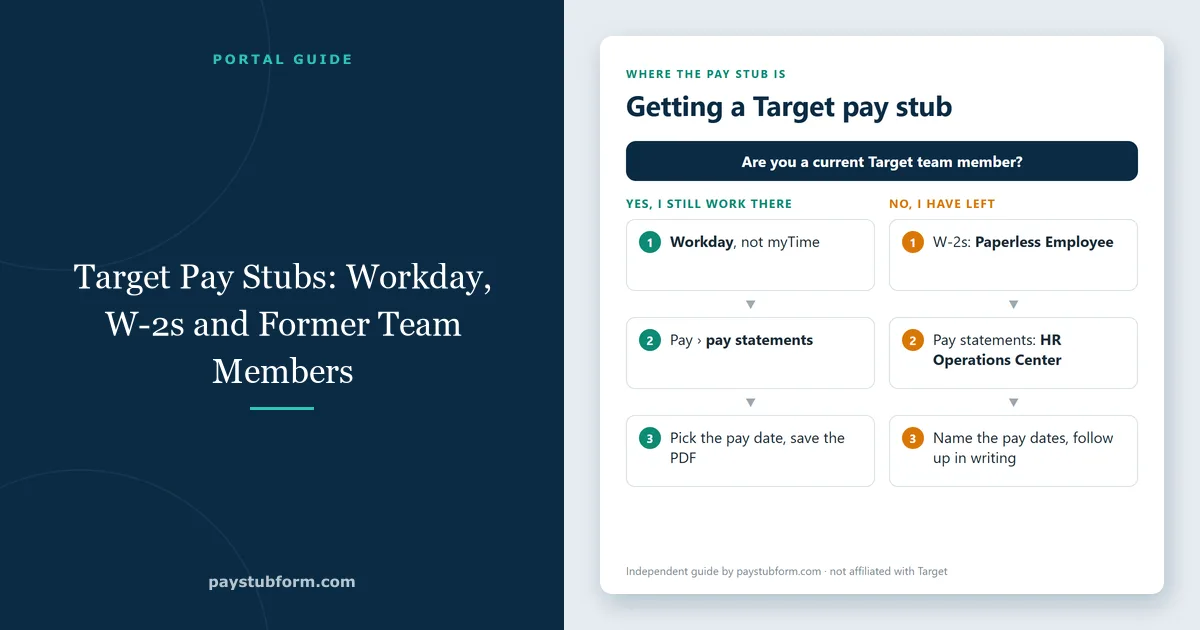
Target pay stubs are in Workday. Target's own Team Member Services page names Workday as the place for your team member profile, pay statements and HR resources — not myTime, which is the scheduling app, and not your Target.com shopping account. Former team members use a different site, Paperless Employee, for year-end tax statements, and Target's HR Operations Center handles anything the two systems cannot.
This guide covers each route, what you need to sign in, how to read a Target pay statement, and the W-2 deadlines that catch people out — including one that falls in mid-October.
Quick take: Current team members view pay statements in Workday and get W-2s under Menu > Tax Forms (W-4, W-2). Former team members create an account at paperlessemployee.com/target with their 10-digit team member number, date of birth and Social Security number. Free electronic W-2 access runs through October 15 of the filing year; after that Target's page says fees apply. Help line: Target HR Operations Center, 1-800-394-1885.
Tip: search results are full of look-alike "Target pay stub portal" sites. The only addresses you need are target.com, Workday through Target's own sign-in, and paperlessemployee.com/target.
1. myTime or Workday: which one has the pay stub?
Target team members use two apps, and mixing them up is the most common reason for a failed search:
| App | What it is for | Pay stub? |
|---|---|---|
| myTime | Schedules, timecards, availability, picking up or swapping shifts | No — but its timecards are what you check your stub against |
| Workday | Team member profile, pay statements, tax forms, HR resources | Yes |
| Paperless Employee | Year-end tax statements (W-2), replacement and prior-year copies | W-2s; the route for former team members |
myTime is still useful: the hours on your timecard for a pay period are exactly what the earnings section of your Workday statement should show.
2. Current team members: getting a pay statement from Workday
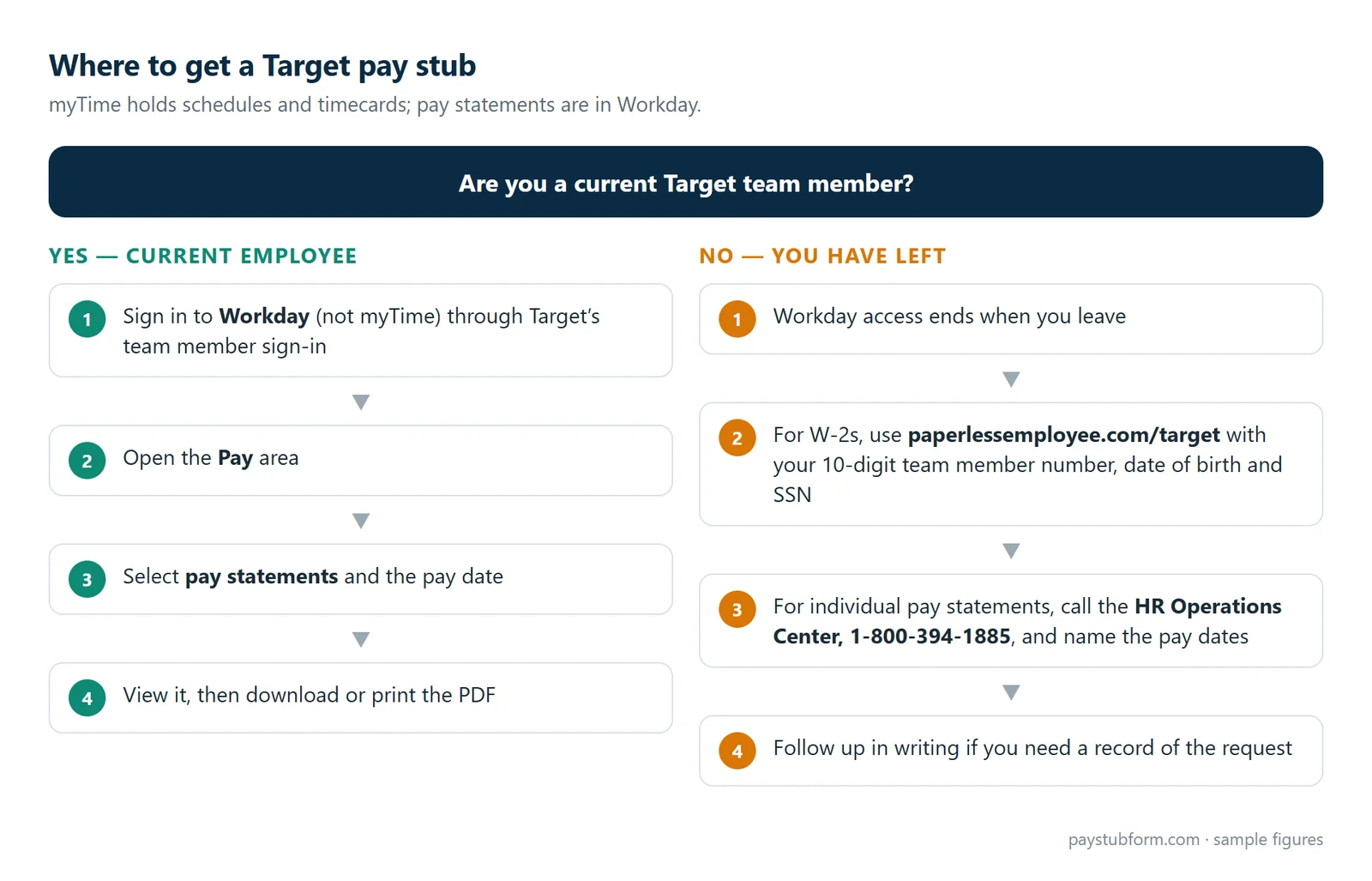
- Sign in to Workday through Target's team member sign-in, on the Workday app or a browser.
- Open the Pay area from the menu.
- Select pay statements and choose the pay date you need.
- View it, then download or print it as a PDF.
Your team member number is printed at the top of your pay stub, according to Target, so keep one old statement handy — you will need that number for Paperless Employee later. If you sign in from a personal device, expect a verification step.
Target also offers DailyPay, which lets team members transfer pay for hours already worked before payday. As with any earned-wage-access tool, money you transfer early is not paid again on payday, so the bank deposit can be smaller than the net pay figure on your statement. Our guide to direct deposit and pay stubs shows how to match them.
3. Former team members: Paperless Employee and HR
When you leave Target your Workday access ends, but your year-end tax statements stay available. Target's page directs former team members to paperlessemployee.com/target:
- Log in, or create an account with your 10-digit team member number, date of birth and Social Security number.
- Enter your contact preferences, then select Year-End Tax Statements.
- For an older year, choose Year-End Statements, then Show All Years. You can download a PDF or have the form mailed.
For copies of individual pay statements after you leave, call the Target HR Operations Center on 1-800-394-1885 and name the pay dates you need. A written request is a reasonable backup: under the federal Fair Labor Standards Act employers must keep payroll records for at least three years, and many states give former employees a right to copies of their own wage records.
Leaving soon? Download every pay statement you might need — for a lease, a loan, or unemployment — while Workday still works.
4. W-2s: the dates that matter
- Mid-January: electronic W-2s are typically available, according to Target.
- January 31: Target provides W-2s by this date. Store and supply chain team members still employed get paper copies at work; former team members get theirs by mail.
- December 31 address: paper W-2s go to the address in Workday on December 31. If it was wrong and the form never arrived, Target's page says you must buy a replacement — so update your address before year-end, especially if you are a seasonal team member moving after the holidays.
- October 15: free electronic access to the W-2 runs through October 15 of the filing year. After that, Target's page says fees apply, and a paid PDF download is only available for 10 minutes — save it immediately.
Target also warns that your year-end pay statement should not be used to confirm annual taxable income, because box 1 of the W-2 reflects pre-tax deductions such as retirement contributions. Our guides to W-2 versus your final pay stub and W-2 boxes 1, 3 and 5 explain why the numbers differ.
5. Reading a Target pay statement
A Workday pay statement has the usual sections, each with current and year-to-date amounts:
- Earnings: regular hours, overtime, and any premium or holiday pay lines. Check hours against myTime and overtime by workweek — see overtime on a pay stub.
- Taxes: federal income tax, Social Security, Medicare and state or local taxes where you work. Rules vary sharply by state; Minnesota, Target's home state, has its own income tax and paid leave rules, while Texas has no state income tax line at all. Our state and local taxes guide covers the differences.
- Deductions: health coverage, 401(k) and other elections — see paycheck deductions explained.
- Net pay and YTD: what was paid to you, and the running totals for the year — see what YTD means.
Unfamiliar codes are decoded in our pay stub abbreviations glossary, and if your pay changed from one statement to the next, work through why a paycheck changes.
6. Seasonal team members
Holiday hires use the same Workday pay statements as everyone else. Two things are worth knowing. A short job can have more federal tax withheld than you will finally owe, because payroll assumes the weekly amount continues all year — our guide to holiday and seasonal job taxes explains the refund and the part-year method. And because your Workday access ends with the job, download your statements before your last shift and make sure your December 31 address is right for the W-2.
7. Using a Target pay stub as proof of income
Send the PDF from Workday, not a phone photo, and send consecutive pay dates — usually the last two to four. Change nothing on it; if something is wrong, ask HR to correct it. Our guide to pay stubs as proof of income explains what landlords and lenders check.
The five-minute version
- Pay statements: Workday, not myTime.
- Check hours on the statement against your myTime timecard.
- W-2 while employed: Workday, Menu > Tax Forms (W-4, W-2).
- W-2 after leaving: paperlessemployee.com/target with your 10-digit team member number.
- Keep your Workday address current on December 31.
- Anything else: Target HR Operations Center, 1-800-394-1885.
Quick answers
How do I see my Target pay stub?
Sign in to Workday through Target's team member sign-in, open the Pay area and select the pay statement for the pay date you need. myTime shows schedules and timecards, not pay statements.
How do former Target employees get pay stubs?
Year-end W-2s are on paperlessemployee.com/target. For individual pay statements after Workday access ends, call the Target HR Operations Center on 1-800-394-1885 or send HR a written request naming the pay dates.
Where do I find my Target team member number?
At the top of any Target pay stub. Paperless Employee asks for the full 10-digit number.
Is the Target W-2 free?
Electronic access is free through October 15 of the filing year. Target's page says fees apply after that, and also if you need a replacement because your address was wrong on December 31.
Why doesn't my W-2 match my last pay stub?
Because W-2 box 1 excludes pre-tax deductions such as 401(k) contributions. Target itself advises not to use the year-end pay statement to confirm taxable income.
Can I recreate a Target pay stub myself?
No. If Target pays you, the valid pay stub is the one Target issued. Our pay stub generator is for people who run their own payroll, such as freelancers and small employers.
Sources
- Target — Team Member Services: Workday for pay statements, W-2 steps for current and former team members, the October 15 free-access date, and the HR Operations Center number.
- Target — Pay and benefits: DailyPay early access to earned pay.
- U.S. Department of Labor — Fact Sheet #21: employer payroll recordkeeping requirements.
- IRS — About Form W-2: what the wage and tax statement reports.
General information, current for 2026. Paystub Form is not affiliated with Target; systems and policies can change, so confirm details with Target HR.


Comments (0)
Loading comments...
Leave a Comment