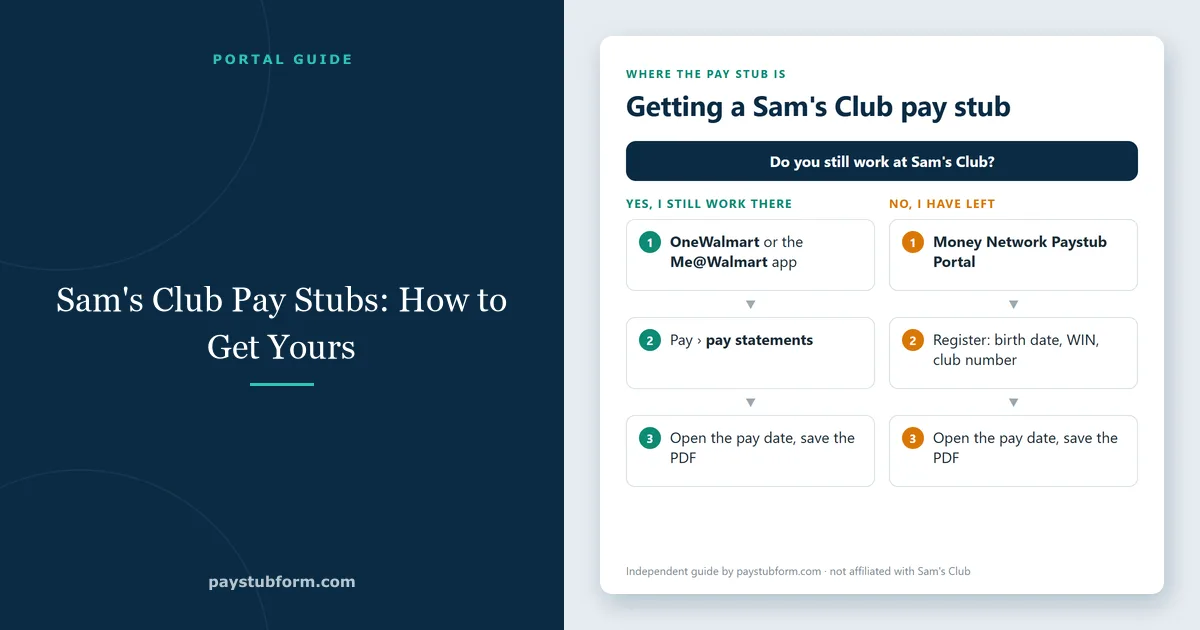
The short answer surprises most people who go looking: there is no separate Sam's Club payroll system. Sam's Club is part of Walmart Inc., so your pay stubs live in the same place Walmart associates use, behind the same credentials. Once you know that, the whole thing takes about two minutes.
Tip: if a site offers you a "Sam's Club paystub portal" login that is not a Walmart address, close it. There isn't one, and a page asking for your WIN and Social Security number is worth being suspicious of.
What you need before you log in
The details are the same ones Walmart asks for, because it is the same payroll record:
- Your WIN — the nine-digit Walmart Identification Number on your badge and on any previous pay stub. Club associates have one too.
- Your club number — the four-digit number of the club you worked at. This is what the systems call the facility number.
- Your date of birth, and a PIN or password.
If you still work at the club
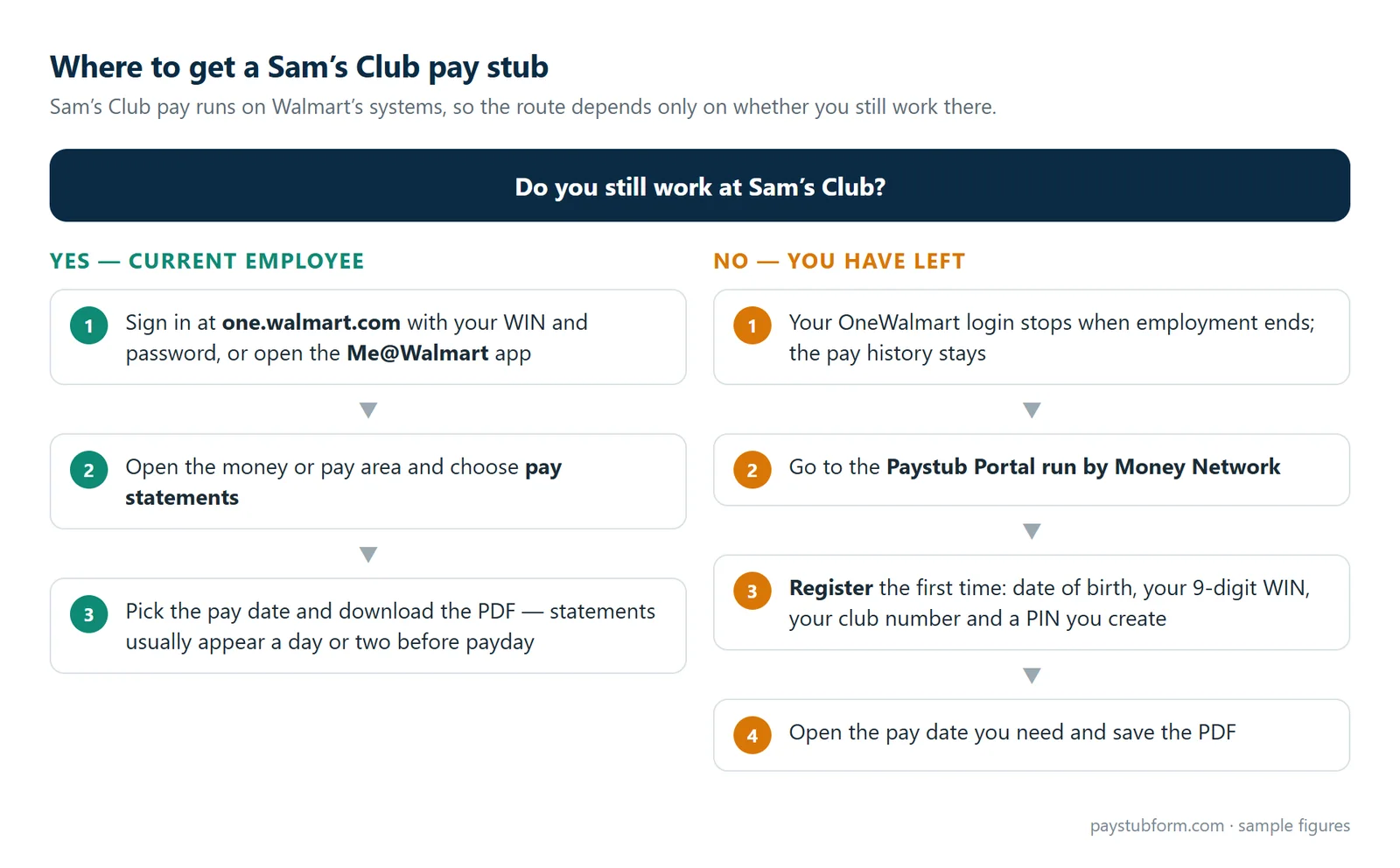
Sign in at one.walmart.com with your WIN and password, then open the money or pay area and choose your pay statements. Each pay period is listed by date and downloads as a PDF. The Me@Walmart app shows the same statements and is faster for a quick check of hours, though the desktop site is easier when you need several PDFs at once.
Signing in from a personal device rather than a club terminal usually triggers two-step verification, so keep your phone nearby. Statements typically appear a day or two before payday rather than on the day itself.
If you have left Sam's Club
Your OneWalmart login stops working when employment ends — that is immediate, not gradual. The pay history does not disappear with it. Former associates of both Walmart and Sam's Club are directed to the Paystub Portal run by Money Network, where, in the company's own words, all associates including terminated associates can view their pay stubs online.
Register rather than trying to log in if you have never used it: first-time registration asks for your date of birth, your full nine-digit WIN, your club number and a PIN you create. Two things commonly go wrong, and both have simple explanations. If your final pay period is missing, payroll data moves between systems in batches after a separation and can lag by several weeks. If a password reset goes nowhere, the code is being sent to contact details payroll still holds — often a phone number or address you stopped using.
The full walkthrough of the Walmart pay stub portal covers the registration screens step by step, including what to do when you are locked out of all of them. Everything in it applies to Sam's Club unchanged. If you also work for another large employer, see our guides to Amazon and Target pay stubs.
Pay stub or W-2?
These get asked for interchangeably and are not interchangeable. A pay stub covers one pay period and evidences current income, which is what a landlord or a lender wants. A W-2 summarises a calendar year and is what you file taxes with. W-2s appear from late January, and for Walmart-family employers they are handled through mytaxform.com, the Equifax-run service, using employer code 10108.
Sending a pay stub to someone who asked for it
Whoever requested it will look at it with some suspicion, because pay stubs are the easiest income document to fake. Three habits make yours easy to accept.
Send the PDF you downloaded rather than a photo of your screen — a cropped phone shot is the first thing that gets sent back. Send consecutive pay periods, usually the last two to four; with a club schedule that varies week to week, a longer stretch actually helps you, because three months of real hours reads as stable where two weeks can look alarming. And change nothing, not even a misspelled name. Editing an issued pay stub turns a payroll record into a falsified document regardless of how small the change or how right you were about the error. If something on it is wrong, ask payroll to reissue it.
Our guide to using pay stubs as proof of income covers how many to send and what landlords and lenders check.
Reading your Sam's Club pay stub
The layout is Walmart's, and the logic is the same as any U.S. pay statement. Earnings come first: regular hours, overtime and any premium pay, each with hours and rate. Check the hours against your schedule for that pay period — overtime is calculated per workweek, so our guide to overtime on a pay stub is worth reading if a long week looks underpaid. Paid time off and holiday pay appear on their own lines; see PTO and holiday pay on a pay stub.
Taxes and deductions follow: federal income tax, Social Security, Medicare, state tax where your state has one, then anything you elected, such as medical or the 401(k). Paycheck deductions explained covers each line. The year-to-date column is the running total since January — the figure a lender uses and the one your W-2 should match; see what YTD means on a pay stub.
For a quick check of a club pay stub, our hourly pay stub checklist takes about five minutes.
When none of it works
If you cannot register, cannot receive a code, or your records simply are not there, call Walmart People Services on 800-421-1362 and choose the option for former associates if that applies. Have your Social Security number, your club number and your current mailing address ready.
A written request to HR is the stronger fallback and more people should use it. Under the federal Fair Labor Standards Act employers must keep payroll records for at least three years, and many states give employees an explicit right to request copies of their own wage records. A dated request naming the pay periods you need gets further than a tenth attempt at a password reset. Allow one to two weeks if the copies come by post.
Frequently asked questions
Is the Sam's Club pay stub portal different from Walmart's?
No. Sam's Club is a Walmart division and shares the payroll systems, so current associates use OneWalmart or the Me@Walmart app and former associates use the same Money Network Paystub Portal.
My club number is not being accepted.
Use the four-digit number of the club that employed you, not a number from a club you transferred to later. It appears on old pay stubs.
How long do former associates keep access?
Pay statements remain available to terminated associates, but access is not guaranteed forever and the company can change it. If you know you will need stubs for a lease or a loan, download them before your last day.
Can I use a pay stub I made myself?
Not in place of one your employer issued. Our pay stub generator is built for people who run their own payroll — freelancers, contractors, small employers — and for rebuilding records you are entitled to and can support. If Sam's Club pays you, the document that belongs in an application is the one Sam's Club issued; recreating it yourself is a forged document and is treated as one.
Why did my Sam's Club paycheck change?
Usually hours, overtime in one week, a benefit election, or a change in withholding. Compare the stub with the previous one line by line; our guide to why a paycheck changes works through the common causes.
Where do Walmart associates get their pay stubs?
In exactly the same places. Our Walmart pay stub guide covers both portals in more detail.
The short version
There is no separate Sam's Club payroll portal. Still employed: OneWalmart or the Me@Walmart app, with your WIN. Left the company: the Money Network Paystub Portal, registering with your WIN, club number, date of birth and a PIN. Annual tax form: mytaxform.com, employer code 10108. Locked out of everything: 800-421-1362, with your Social Security number and club number in hand.


Comments (0)
Loading comments...
Leave a Comment