Generate a 1099-NEC for contractors
Enter your business, the contractor and what you paid. It's printed on the official 2026 IRS form, ready to check and download.
- Official Rev. 12-2026 form
- Copies 1, B, 2 and A
- Ready in about five minutes
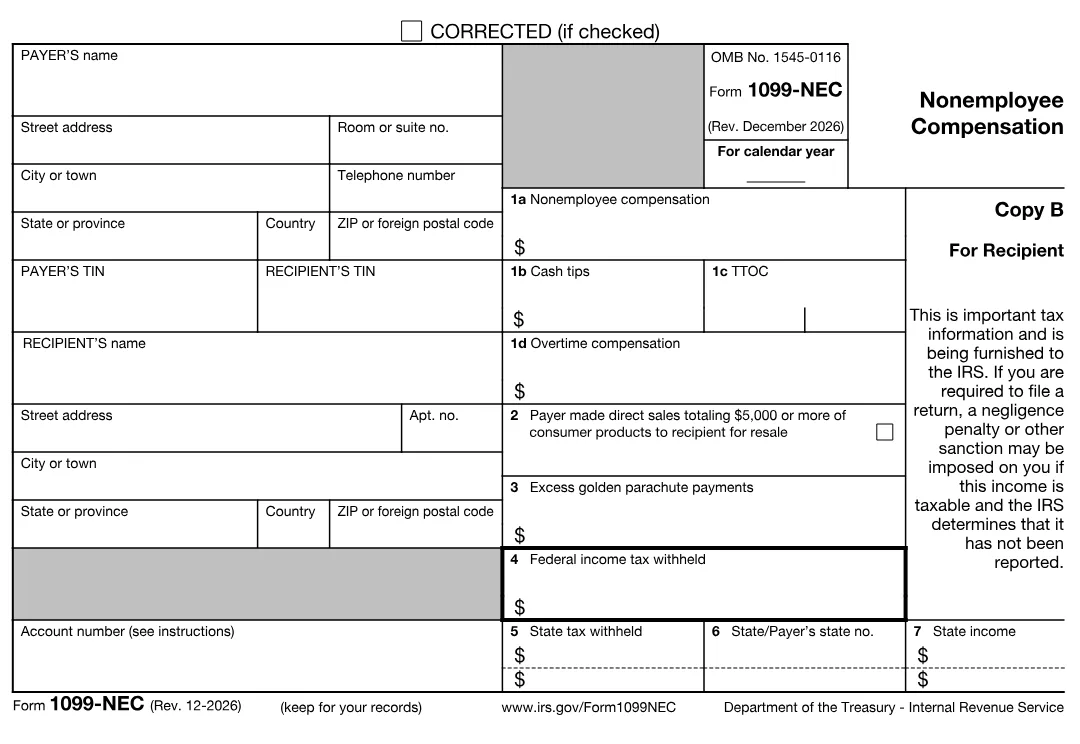
Example1099-NEC: $18,400 paid to a freelance designer for services (box 1a). No tax was withheld, so boxes 4–7 stay empty.
- Free to fill in & preview
- No account needed
- All 50 states + DC
Who gets one
Independent contractors and the 1099-NEC: who needs one
The 1099-NEC is the contractor tax form: it tells the IRS what you paid someone who isn't on your payroll. You owe one to each contractor who meets all of these.
- You paid for services in your business
- Fees, commissions, prizes for work and other pay to a freelancer, consultant or independent contractor. Personal payments, such as hiring a plumber for your home, don't count.
- $2,000 or more in 2026
- For payments made in 2026 the reporting threshold rose to $2,000 for the year (it was $600 through 2025). Add up everything paid to the same person.
- The contractor isn't a corporation
- Individuals, partnerships and most LLCs get a 1099-NEC. C and S corporations generally don't — except attorneys, who get one whatever their entity type.
- You paid by cash, check or bank transfer
- Payments made by card or through a payment app such as PayPal are reported by the payment company on Form 1099-K, so you leave them off the 1099-NEC.
- Collect a W-9 first
- Ask every contractor for Form W-9 before you pay. It gives you the name and TIN to put on the 1099-NEC, and protects you from backup withholding.
- No TIN means backup withholding
- If a contractor won't give you a correct TIN, withhold 24% of each payment, send it to the IRS and report it in box 4.
How it works
How to generate a 1099 for contractors in three steps
Step 1
Enter your business as the payer
Business name, EIN or SSN, phone number and address. If you're outside the US, pick your country and the foreign address fields appear.
Step 2
Add the contractor from their W-9
Their legal name, taxpayer identification number and address, then the total you paid them for the year and any tax you withheld.
Step 3
Check the form, then download
Your numbers appear on the official 2026 Form 1099-NEC. Click any box to correct it, then download Copy 1, B, 2 and A as one PDF.
Box by box
How to fill out a 1099-NEC form
Most contractors only need the payer and recipient boxes and box 1a. Fill in the other boxes only when they apply — an empty box is the right answer for most of them.
Payer
Your business
Name, street address, phone number and your TIN — usually your EIN.
Recipient
The contractor
Name, TIN and address exactly as on their Form W-9.
Box 1a
Nonemployee compensation
Everything you paid them for services during the year.
Box 1bNew
Cash tips
Cash tips the contractor received, with the occupation code in box 1c.
Box 1cNew
TTOC
Treasury Tipped Occupation Code of the work the tips came from.
Box 1dNew
Overtime compensation
The qualified overtime premium included in what you paid.
Box 2
Direct sales
Check it if you sold them $5,000 or more of consumer products for resale.
Box 3
Golden parachute
Excess golden parachute payments to a non-employee.
Box 4
Federal tax withheld
Usually 24% backup withholding when no valid TIN was given.
Box 5
State tax withheld
State income tax you withheld, if any. Two lines for two states.
Box 6
State / payer's state no.
The state's abbreviation and your state ID number.
Box 7
State income
The part of the payment that is income for that state.
Example:you paid a freelance designer $1,500 a month from March to December 2026 by bank transfer — $15,000 in total. Box 1a is 15000.00. You didn't withhold anything, so boxes 4 to 7 stay empty, and you send Copy B to the designer by February 1, 2027. Had you paid $1,800 for the whole year, no 1099-NEC would be needed: that is under the $2,000 threshold.
New for 2026
New on the 2026 1099-NEC: cash tips, TTOC and overtime
The December 2026 revision of Form 1099-NEC splits box 1 in four. Box 1a is the familiar nonemployee compensation; the new boxes report the parts of it that the recipient may be able to deduct under the 2025 tax law:
- Box 1b, cash tips — tips a contractor received in an occupation that customarily received tips, such as a freelance hairstylist or a delivery driver.
- Box 1c, TTOC— the Treasury Tipped Occupation Code of that occupation (for example 101 for bartenders). Use 000 when the occupation isn't on the IRS list.
- Box 1d, overtime compensation — the premium portion of qualified overtime pay included in the payment.
Most contractors don't have tips or overtime, and these boxes stay empty. The generator shows them as optional fields and asks for a TTOC only when you enter cash tips.
Filing
How to file a 1099-NEC with the IRS
Two copies matter: Copy B goes to the contractor, and the IRS copy goes to the IRS. Both are due January 31 — February 1, 2027 for 2026 payments.
E-file through IRIS (free)
- Apply for an IRIS Transmitter Control Code (TCC) in IRS e-Services. Allow a few weeks before your first filing.
- Sign in to the IRIS Taxpayer Portal and type in each 1099-NEC, using your PDF as the reference.
- Submit, and keep the acknowledgment with your copy of the form.
E-filing is required once you file 10 or more information returns of any kind in a year.
Where to mail a 1099-NEC
Paper filing is allowed under 10 returns, but only on the IRS's scannable red-ink forms, ordered from IRS.gov/EmployerForms, with Form 1096 as the cover sheet. Mail them to the IRS center listed for your state in the General Instructions for Certain Information Returns. A Copy A printed from a PDF — including ours — can't be mailed in.
Giving the contractor Copy B
Hand it over, mail it, or email the PDF if the contractor agreed to receive it electronically.
Copies in your PDF
Which 1099-NEC copy goes where
Your PDF has the four copies of the official form with the same numbers on each, plus the IRS Instructions for Recipient.
Copy 1
For the state tax department, where your state asks for one.
Copy B
For the recipient, to keep with their tax records.
Copy 2
For the recipient to file with a state income tax return.
Copy A
The IRS copy, printed in red. For your records only: file it online through IRIS.
Fillable form or generator
Free 1099-NEC fillable form vs. the 1099-NEC generator
Both give you the same official IRS form. The difference is how much of the work you do yourself.
| IRS fillable PDF | Paystub Form generator | |
|---|---|---|
| Price | Free | $7.99 per form, preview free |
| Form | Official Form 1099-NEC | Official Form 1099-NEC (Rev. 12-2026) |
| Filling it in | Type into each field of each copy | One guided questionnaire fills every copy |
| Checks | None | Required fields, 9-digit TINs, ZIP codes, TTOC with cash tips |
| Foreign addresses | Fit them in yourself | Country picker with foreign fields |
| Corrections | Edit field by field | Click any value on the form |
| Copy A | Informational only | Informational only — e-file through IRIS |
| Delivery | Save it yourself | PDF download plus a link by email |
For the contractor
What the contractor does with a 1099-NEC: Schedule C and self-employment tax
Box 1a is self-employment income. The contractor reports it on Schedule C (Form 1040) together with their business expenses, and pays income tax on the profit plus 15.3% self-employment tax (Social Security and Medicare) through Schedule SE. Because nothing is withheld, contractors usually pay quarterly estimated tax during the year.
Contractors who need proof of income between 1099s can keep a record of each payment — see pay stubs for contractors.
Pricing
One price per 1099-NEC. No subscription.
Fill in the form and review every box for free. You only pay when you're ready to download the PDF.
Form 1099-NEC
$7.99 per form
- Fill in the form
- Free
- Review every box
- Free
- Download the PDF
- $7.99
Included with every 1099-NEC
- Official 2026 IRS Form 1099-NEC
- Editable review on the form itself
- Copy 1, B, 2 and A in one PDF
- PDF download plus a link by email
Questions
1099-NEC FAQ
What is Form 1099-NEC?
Form 1099-NEC, Nonemployee Compensation, reports what a business paid an independent contractor for services during the year. The contractor gets Copy B, and the IRS gets the same information from the business.
How do I generate a 1099 for a contractor?
Get the contractor's W-9, then open the 1099-NEC builder: enter your business, the contractor's name, TIN and address, and the year's total in box 1a. Check the filled-in form, then download the PDF and give Copy B to the contractor.
Who needs a 1099-NEC in 2026?
Any independent contractor — an individual, partnership or LLC that isn't taxed as a corporation — that your business paid $2,000 or more for services in 2026. Attorneys get one even if they are incorporated.
When is the 1099-NEC due?
January 31 of the following year, for both the contractor's copy and the IRS copy. For 2026 payments that is February 1, 2027, because January 31 falls on a Sunday. There is no automatic extension.
How do I file a 1099-NEC with the IRS?
Online through the IRS Information Returns Intake System (IRIS), which is free: apply for an IRIS Transmitter Control Code in IRS e-Services, then enter or upload your forms. Paper filing needs the IRS's own scannable red Copy A and Form 1096.
Where do I mail a 1099-NEC to the IRS?
Paper forms go to the IRS processing center listed for your state in the General Instructions for Certain Information Returns, with Form 1096. They must be the official red-ink forms — a Copy A printed from a PDF can't be mailed — which is why most small businesses e-file through IRIS instead.
Is there a free 1099-NEC fillable form?
The IRS posts a fillable PDF of Form 1099-NEC for free, but its Copy A can't be filed and you have to work out every field yourself. Our generator fills the same official form from a guided questionnaire, checks the details and gives you every copy in one PDF.
Does a 1099-NEC go on Schedule C?
Usually, yes. A contractor reports box 1a income on Schedule C (Form 1040) as business income and pays self-employment tax on the profit with Schedule SE.
What's the difference between a 1099-NEC and a 1099-MISC?
The 1099-NEC is only for pay for services by non-employees. Rents, royalties, prizes, medical and attorney payments and other income go on the 1099-MISC.
How much does it cost?
Filling in the 1099-NEC and previewing it is free. Downloading the finished PDF costs $7.99 per form, with no subscription.
Reviewed October 2026 against the IRS Form 1099-NEC (Rev. December 2026) and the 2026 Instructions for Forms 1099-MISC and 1099-NEC.
Ready to create your 1099-NEC?
About five minutes from start to PDF.