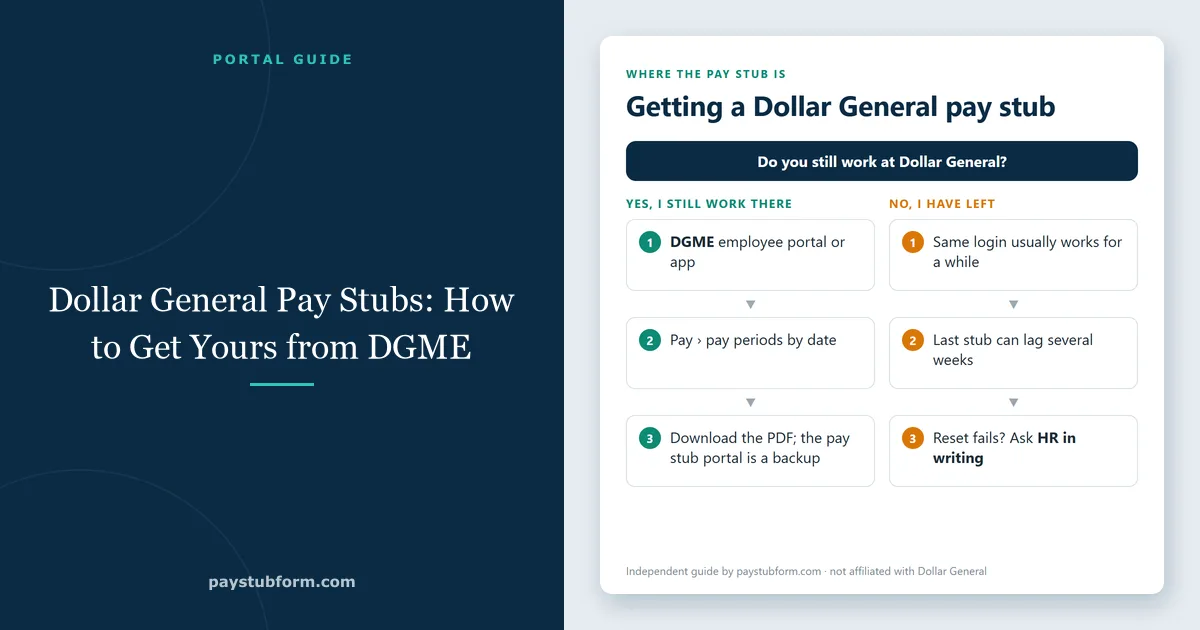
Dollar General runs its pay records through DGME — the employee portal staff are pointed to for schedules, benefits and pay. Getting a pay stub out of it is straightforward once you are in. The friction is almost always getting in, especially if you have already left the company.
Here is what the process looks like, what to have ready before you start, and what your options are when the portal will not cooperate.
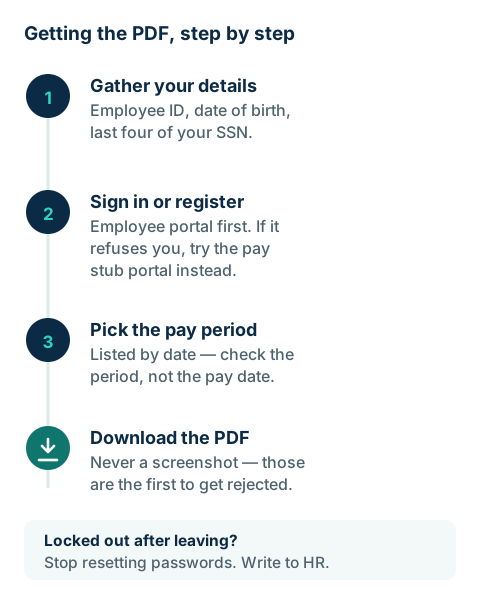
What to have ready before you log in
Registration and password resets both ask for identifying details, and hunting for them halfway through is what turns this into a long afternoon. Have these to hand:
- Your employee ID — the number used across DG's systems, printed on previous pay stubs.
- Your legal first name and date of birth, exactly as payroll has them, not a shortened version.
- The last four digits of your Social Security number.
- A PIN or password you set during registration.
If you no longer have your employee ID, it appears on any old pay stub and on your W-2. Without either, a store or district manager is the fastest route — they can escalate to DG's employee support in a way an ex-associate calling cold usually cannot.
Where Dollar General pay stubs live
Two names come up, and people often assume they are competing options. They are two doors into the same payroll data.
The DGME employee portal
This is the general employee site: schedule, benefits enrolment, tax documents and pay. Signing in with your employee ID and password gets you to a pay or payroll section listing pay periods by date, each downloadable. There is also a DGME mobile app, which is quicker for a glance at hours but less convenient when you need to save several PDFs.
The dedicated pay stub portal
Dollar General also uses a separate pay stub portal, the kind of hosted service many large retailers use for wage statements. It asks for the same identifying details and shows the same statements. If one of the two is down or refuses your details, trying the other is genuinely worth a minute — they authenticate slightly differently.
Access details do change: portals get replaced, and what is required can differ by role and state. If you are currently employed, the definitive answer is whatever your store or district manager can confirm, not a guide on the internet — including this one.
If you have already left Dollar General
Former employees generally keep portal access for a period after leaving, using the same credentials — which is more generous than many employers. Two things commonly go wrong:
Your final pay period is missing. Payroll data moves between systems in batches after a separation, so the last stub can lag by several weeks. If you left recently, wait before assuming the record is gone.
The password reset goes nowhere. Reset links and codes go to whatever email or phone number payroll holds, which for most people is the work address they lost access to on their last day. This cannot be fixed from the login screen — it needs a human in DG's employee support or HR.
If the portal is a dead end, ask in writing instead. Under the federal Fair Labor Standards Act, employers must keep payroll records for at least three years, and many states give employees an explicit right to request copies of their own wage records — with a deadline for the employer to respond. A short written request naming the pay periods you need, sent to HR, is a stronger move than another round of password resets. Allow one to two weeks if the copies come by post.
Pay stub or W-2 — which one do you need?
These get requested interchangeably and they are not interchangeable. A pay stub covers one pay period and shows current earnings; a W-2 summarises a calendar year and is the form you file taxes with. Landlords, lenders and benefits offices want stubs. The IRS wants the W-2.
W-2s appear in the portal during tax season, typically from late January. If yours is not there and you have left the company, the mailing address on file is the usual culprit — an old address means the paper copy went somewhere else, and updating it is a phone call rather than a portal setting.
Reading what you downloaded
The layout differs between employers; the logic does not. Earnings come first — regular hours, overtime and any premium pay, each with its rate. Overtime is owed per workweek, not per pay period, which our overtime guide explains, and paid leave appears on its own line — see PTO and holiday pay on a pay stub. Taxes and deductions come out next: federal income tax, Social Security, Medicare, state income tax where your state has one, then anything you elected, such as medical or a retirement contribution. What remains is net pay, the figure that reaches your account.
The column worth understanding is year-to-date. It is the running total for the calendar year, and it is what a lender uses to annualise your income and what you compare against your W-2 at tax time. Our guide to what a pay stub is and what belongs on one goes line by line if any of this is unfamiliar, and our hourly pay stub checklist is a five-minute check of a store pay stub.
Using a Dollar General pay stub as proof of income
Whoever asked for it will treat it with some suspicion, because pay stubs are the easiest income document to fake. Our guide to pay stubs as proof of income covers what landlords and lenders check; three things make yours easy to accept:
- Send the PDF, not a screenshot. A downloaded PDF keeps its layout; a cropped phone photo is the first thing sent back.
- Send consecutive pay periods — usually the last two to four. A single good week reads as cherry-picked, and with a variable retail schedule a longer stretch actually helps you: three months of real hours looks stable where two weeks can look alarming.
- Change nothing. Not an address, not a misspelled name. Editing a pay stub — even to correct something genuinely wrong — turns a payroll record into a falsified document. If a detail is wrong, have payroll reissue it.
Since we make pay stub software, the honest version: our pay stub generator is for people who run their own payroll — freelancers, contractors, small employers — and for reconstructing records you are entitled to and can support. If you work at Dollar General, the document that belongs in an application is the one DG issued. Recreating it yourself is not a workaround; it is a forged document and is treated as one.
Picking up a holiday job elsewhere? Our guides to Amazon pay stubs and Target pay stubs cover where those employers keep theirs, and seasonal job taxes explains why a short job's withholding often comes back as a refund.
Frequently asked questions
How long can former employees use the portal?
Access usually continues for a period after leaving, but it is not permanent and DG can change it. If you know you will need stubs later — for a lease or a loan — download them before your last day.
Can I get a pay stub without my employee ID?
Not through the portal; the ID is the account key. A written request to HR, identifying yourself by name, Social Security number and store number, is the alternative.
My hours or rate look wrong.
Compare the stub against your schedule and time punches for that exact pay period, then raise it with your store manager. Corrections normally arrive as an adjustment on a later stub rather than a reissued one.
Does the app show the same stubs as the website?
Yes — both read the same payroll records. The website is easier when you need to download several periods.
Why is my Dollar General paycheck different this week?
Usually different hours, overtime in one week, a benefit change or a withholding update. The pay period also rarely matches the pay date. Compare it line by line with the last stub; our guide to why a paycheck changes lists the common causes.
Are other retailers' pay stub portals similar?
The details differ, but the pattern is the same: an employee portal while you work there and a separate route after you leave. See our guides for Walmart and Sam's Club.
The short version
Have your employee ID, date of birth and the last four of your SSN ready. Sign in to the employee portal, or the pay stub portal if that one refuses you, and download the PDF rather than screenshotting it. Left the company and locked out? Stop resetting passwords and send a written request to HR instead — the three-year retention rule is on your side, and a dated request in writing gets further than a tenth login attempt.


Comments (0)
Loading comments...
Leave a Comment