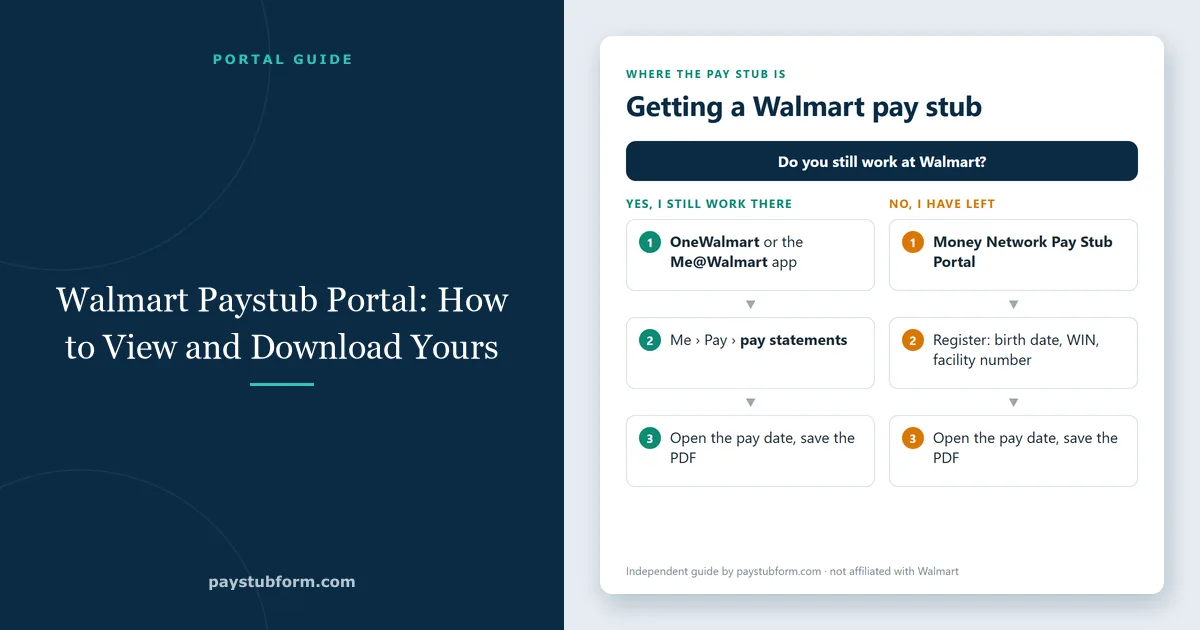
If you need a copy of your Walmart pay stub — for a landlord, a loan application, a tax question, or simply to check that your hours were paid correctly — the document is already sitting online. Which door you go through depends entirely on one thing: whether you still work there.
That single fact trips most people up. The portal that current associates use stops working the moment employment ends, and the portal former associates use is run by a different company altogether. This guide covers both paths, plus what to do when neither one lets you in. Sam's Club associates use exactly the same systems — our Sam's Club pay stub guide covers the club-specific details.
Quick take: Still at Walmart? Sign in at one.walmart.com or open the Me@Walmart app with your Walmart user ID. Left Walmart? Use the Money Network Pay Stub Portal at paystubportal.com and register with your birth date, WIN and facility number. Both routes are shown step by step below.
What you need before you log in
Have these in front of you. Hunting for them mid-login is what turns a two-minute task into an afternoon:
- Current associates: your Walmart user ID (the short login name, for example "wm5p4rk" — not your WIN) and password, plus your phone for two-step verification.
- Former associates: your WIN (the nine-digit Walmart Identification Number on your badge and older pay stubs), your facility number (store, club, DC or Home Office department number, up to five digits), and your date of birth in MMDDYY format.
If you have lost your WIN, it appears on older pay stubs and on your W-2, and the registration page has a "Don't know WIN?" link. If you have none of those, the phone number at the end of this article is the way back in.
Current associates: OneWalmart and the Me@Walmart app
While you are on the payroll, your pay statements live behind your regular Walmart sign-in.
On a computer: step by step
- Go to one.walmart.com. You are sent to Walmart's sign-in page.
- Enter your user ID, leave Country/Region on United States, and choose your Location — Store/Club for store and Sam's Club associates, DC for distribution centers, Homeoffice for corporate staff. Then select Sign In and enter your password.
- Approve the two-step verification code sent to your phone.
- In OneWalmart, open Me, then the pay section, and choose your pay statements. Each pay period is listed by date; open one and save it as a PDF.
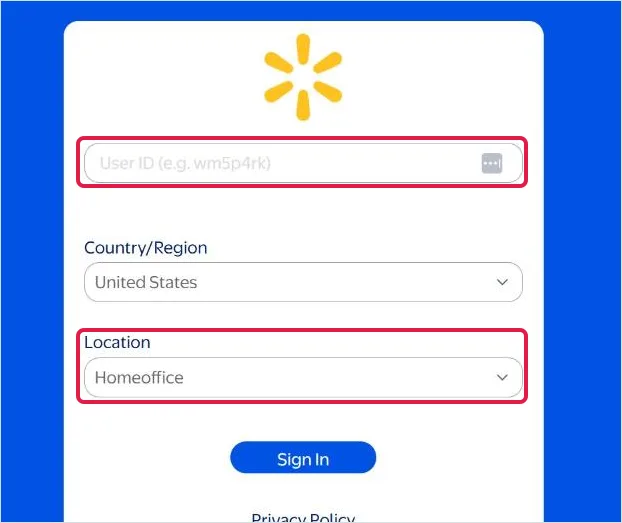
You may also be sent to payroll.walmart.com, Walmart's payroll site. It uses the same sign-in page, so it only works while your Walmart user ID is active.
On your phone
The Me@Walmart app shows the same pay statements with far less friction, because you are already signed in. Open the pay section and you will find both your most recent stub and the archive behind it. For a quick check of hours or net pay, the app is the fastest route; for a document you need to send to someone else, download the PDF rather than screenshotting the screen.
If two-step verification blocks you
The most common lockout is an old phone number on the account. Verification codes go to whatever number payroll has on file, which for many associates is a number they stopped using years ago. That cannot be fixed from the sign-in page — your people lead or People Services has to update it.
Former associates: the Money Network Pay Stub Portal
Once you leave Walmart, your Walmart user ID stops working — access ends with employment, not gradually. Your pay history does not disappear, though. Walmart's own alumni pay stub page says that all associates, including terminated associates, can view their pay stubs online through Money Network's Pay Stub Portal. This is how to get there.
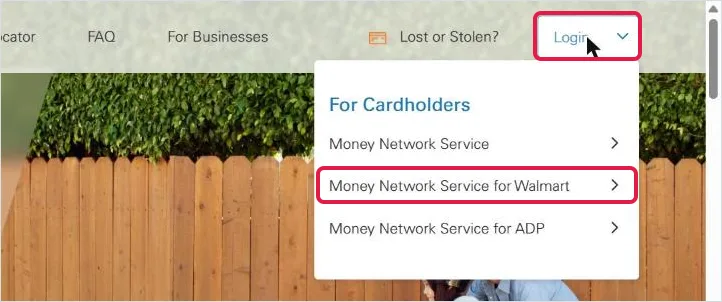
Step 1: Open Money Network and choose "Money Network Service for Walmart"
Go to moneynetwork.com, open the Login menu at the top right, and select Money Network Service for Walmart.
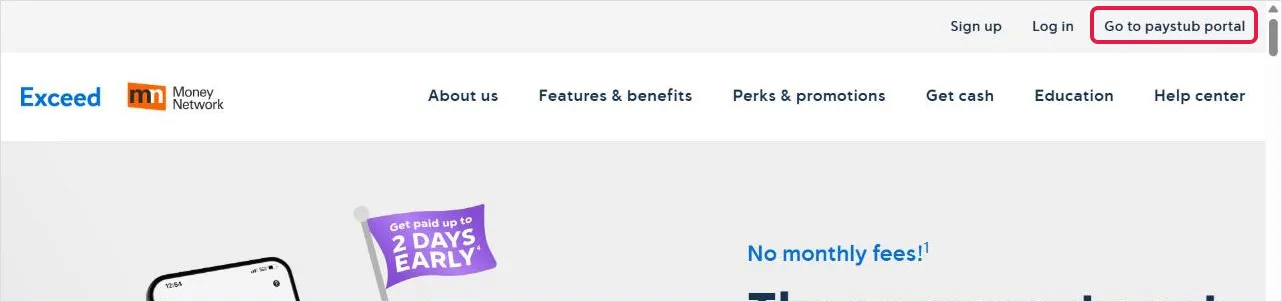
Step 2: Select "Go to paystub portal"
The Walmart service now opens on the Exceed site (exceedcard.com), Money Network's pay card brand for Walmart associates. You do not need an Exceed card: select Go to paystub portal in the top right corner.
Shortcut: you can open the portal directly at paystubportal.com; the page shows the Walmart and Sam's Club logos at the top.
Step 3: Register on your first visit, or sign in
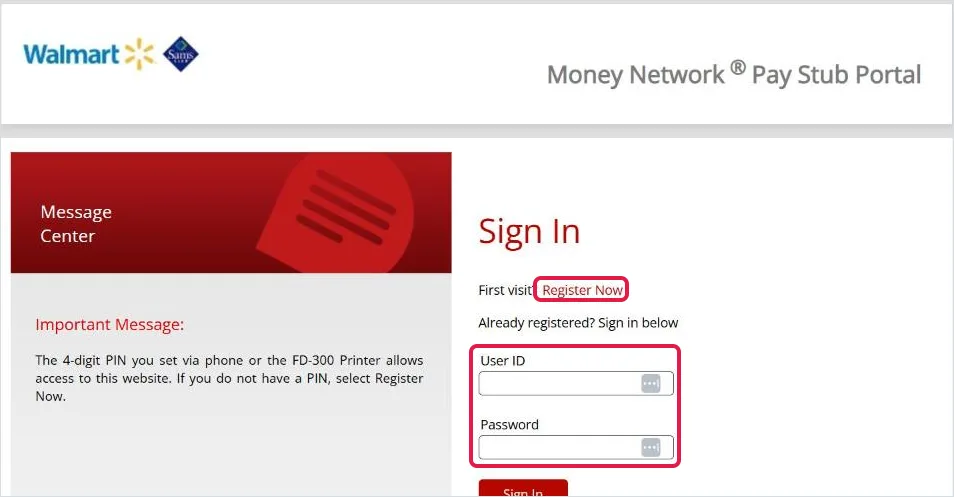
On the Money Network Pay Stub Portal, select Register Now if this is your first visit. If you have registered before, sign in with the user ID and password you created.
Step 4: Enter your birth date, WIN and facility number
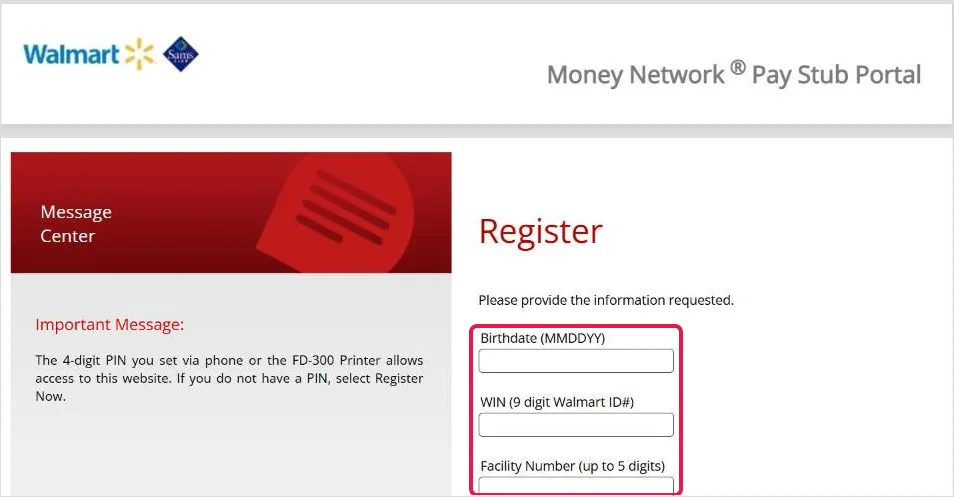
The registration page asks for your birthdate (MMDDYY), your WIN (nine digits) and your facility number (up to five digits — your store or club number, DC number or Home Office department number). Select Next and follow the remaining prompts to finish registering. The portal's own note explains that the four-digit PIN you set by phone or at a store pay stub printer is what gives you access; if you never set one, registering is how you create it.
Once you are in, choose the pay date you need and download the statement as a PDF. This portal is not connected to any pay card you may have had: having closed a card account does not remove your pay statements.
Why your last paycheck might not be there yet
Payroll records move from the active-employee system to the former-associate database in batches, and that migration can take several weeks. If you left recently and your final pay period is missing, it is usually a timing issue rather than a lost record. Check again after a few weeks before escalating.
Download a copy that will actually be accepted
Whoever asked for your pay stub — a leasing office, a mortgage broker, a caseworker — is going to look at it with some suspicion, because pay stubs are the single easiest income document to fake. You can make their job easier:
- Save the PDF, not a screenshot. A PDF downloaded from the portal keeps its layout and metadata. A cropped phone photo of a screen is the first thing that gets sent back.
- Send consecutive pay periods. Most requesters want the last two to four in a row. A single stub from an unusually good week reads as cherry-picked.
- Do not edit anything. Not the address, not a typo in your name. Altering a pay stub — even to correct something genuinely wrong — turns a payroll document into a falsified one. If a detail is wrong, have payroll reissue it.
How to read your Walmart pay stub
Once the PDF is open, the numbers follow the same logic as any US pay statement.
Earnings
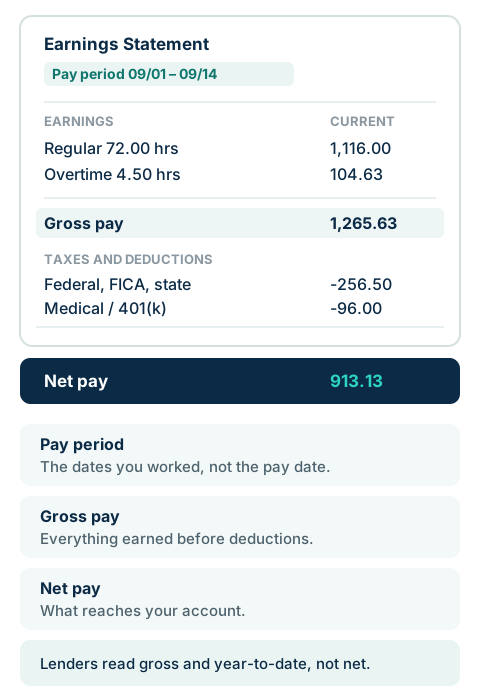
Regular hours, overtime, and any premium or incentive pay are listed separately, each with its rate and hours. This is where to look if you are checking a shift that seems to be missing: compare the hours shown here against your schedule for that pay period, not against the dates on your bank deposit. Overtime is calculated per workweek; our overtime guide and hourly pay stub checklist show how to check it.
Taxes and deductions
Federal income tax, Social Security, Medicare and — in most states — state income tax come out first, followed by anything you signed up for: medical, dental, 401(k) contributions, associate stock purchase. Deductions change between pay periods far more often than people expect, usually because a benefit election took effect mid-period. Paycheck deductions explained covers every line, and 401(k) contributions on a pay stub explains the retirement line.
Year-to-date totals
The YTD column is the running total for the calendar year, and it is the column that matters most outside the store. Lenders use it to annualise your income, and at tax time it is what you compare against your W-2. If YTD gross on your last December stub and Box 1 of your W-2 do not match, that is worth a question — though a difference is often explained by pre-tax deductions rather than an error.
If any of these terms are new, our guide to what a pay stub is and what belongs on one goes through each line in more detail.
Pay stub or W-2 — which do you actually need?
People often ask for one and need the other. A pay stub covers a single pay period and proves current income; a W-2 summarises a whole calendar year and is what you file taxes with. Landlords and lenders want stubs. The IRS wants the W-2.
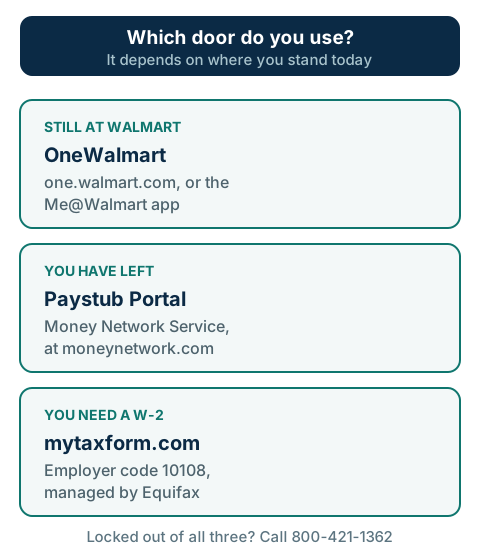
Walmart's W-2 forms are handled separately, through mytaxform.com, the Equifax-run service used by many large employers. You will need Walmart's employer code, 10108, to find the right company. Current and former associates both use this route during tax season.
When none of the portals work
If you cannot register, cannot receive a verification code, or your records simply are not showing, call Walmart People Services at 800-421-1362 and choose the option for former associates if that applies. Walmart lists this number in its own associate contact materials. Have your Social Security number, your former store number and your current mailing address ready — you will be asked for all three.
A written request is your fallback, and a stronger one than most people realise. Under the federal Fair Labor Standards Act, employers must keep payroll records for at least three years, and many states give employees an explicit right to request copies of their own wage records. Documents that are mailed rather than downloaded typically take one to two weeks to arrive, so start early if there is a deadline attached.
Using a Walmart pay stub as proof of income
For most applications, two to four consecutive recent stubs plus your most recent W-2 is the standard package — our guide to pay stubs as proof of income covers what reviewers check. If your hours vary — as they do for a lot of retail schedules — send a longer stretch rather than a shorter one. A three-month view of an irregular schedule looks stable; a two-week view of the same job can look alarming, and you would rather explain the pattern yourself than have an underwriter guess at it.
One honest caveat, since we build pay stub software: a document you generate yourself is not a substitute for your employer's record. Our pay stub generator exists for people who run their own payroll — freelancers, contractors, small employers paying a handful of staff — and for reconstructing records you are entitled to and can support. If you are a Walmart associate, the stub that belongs in an application is the one Walmart issued. Recreating it yourself is not a shortcut; it is a forged document, and it is treated as one.
Worked at another big retailer this year? We have the same walkthrough for Amazon pay stubs in the A to Z app and Target pay stubs in Workday.
Frequently asked questions
How far back do Walmart pay stubs go online?
Both portals hold several years of history, and the federal three-year retention rule is the floor rather than the limit. If you need something older than what the portal shows, request it in writing.
Can I get my pay stub without a WIN?
Not through the portals — the WIN is the account key. People Services can verify you by Social Security number and store number instead.
My hours look wrong. What now?
Compare the hours on the stub to your schedule and time punches for that exact pay period, then raise it with your people lead. Pay corrections are normally issued as an adjustment on a later stub rather than a reissued one.
Does the Me@Walmart app show the same stubs as OneWalmart?
Yes — they read the same payroll records. The app is quicker for checking; the desktop site is easier when you need to download several PDFs at once.
I was paid on a pay card. Does that change anything?
No. How you were paid and where your pay statements are stored are separate systems. Closing a card does not affect access to your stubs.
Why did my Walmart paycheck change?
Usually hours, overtime, a benefit election or a withholding change. Compare two stubs line by line; our guide to why a paycheck changes lists the common causes.
Do other retailers work the same way?
The pattern is similar — an employee portal while you work there, a separate route after you leave. See our Dollar General pay stub guide.
The short version
Still at Walmart: one.walmart.com or the Me@Walmart app, signing in with your Walmart user ID. Left Walmart: the Money Network Pay Stub Portal (moneynetwork.com, then Login, Money Network Service for Walmart, Go to paystub portal), registering with your birth date, WIN and facility number. Need the annual tax form instead: mytaxform.com with employer code 10108. Locked out of all three: 800-421-1362, with your SSN and old store number in hand.
Download PDFs rather than screenshots, send consecutive periods, and never edit what payroll issued — that is the difference between a document that gets accepted and one that gets questioned.


Comments (0)
Loading comments...
Leave a Comment