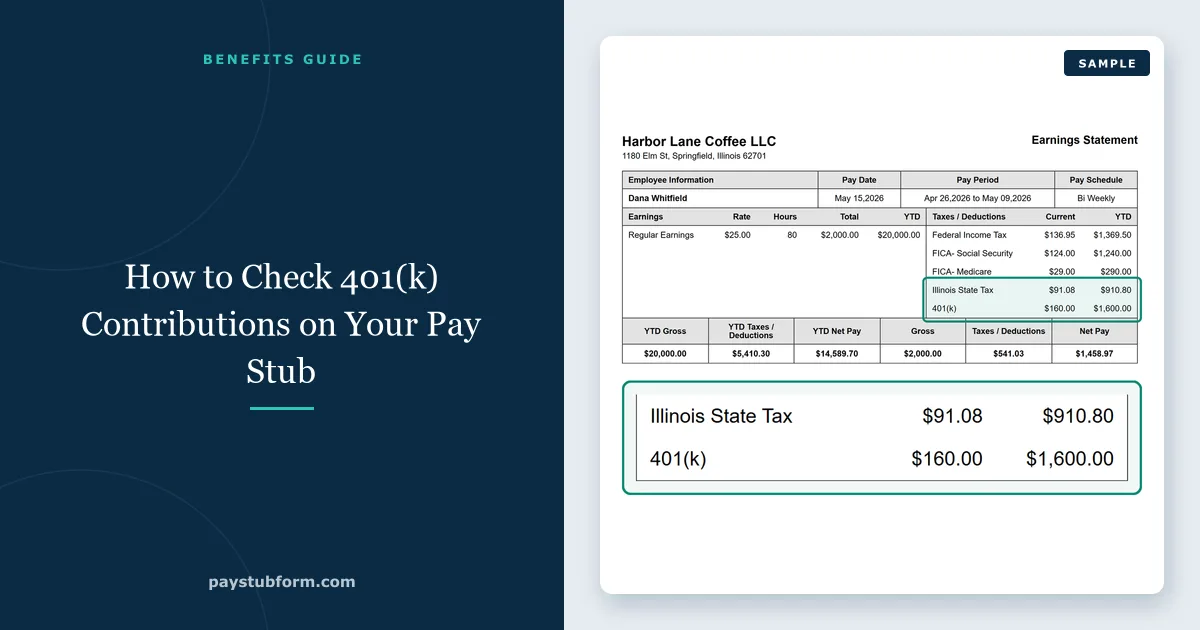
Your 401(k) deduction is one of the few lines on a pay stub you control directly, and one of the easiest to get wrong without noticing. A contribution rate that quietly reset after a payroll migration, a match you are not capturing, a catch-up contribution that moved to Roth without warning in 2026 — none of these announce themselves. They just change a number you were not checking.
Checking it takes about two minutes once you know which lines to read. Here is how 401(k) contributions appear on a pay stub, what the 2026 limits are, and the handful of things worth verifying at least once a year.
Quick take: The 2026 employee deferral limit is $24,500, rising to $32,500 from age 50 and $35,750 between ages 60 and 63. Your own contribution reduces your federal taxable wages; it does not reduce Social Security or Medicare tax.
Finding your own contribution on the stub
Payroll systems label this line a dozen different ways. The most common are 401K, 401(k) EE, PRETAX 401K, DEF COMP, TRAD 401K, ROTH 401K and 401K ER.
The suffix is what matters. EE means employee — your money, deducted from your pay. ER means employer — the match, which is not deducted from anything and should never appear in the deductions column that produces your net pay. If a stub shows both, only the EE line reduces your take-home.
Most plans express your election as a percentage of eligible pay rather than a dollar amount, so the deduction moves with your earnings. A period with overtime or a bonus produces a larger 401(k) deduction without you changing anything — provided your plan treats bonuses as eligible pay, which not all do.
Traditional or Roth: the tax lines tell you which
If the label does not make it obvious, the rest of the stub will.
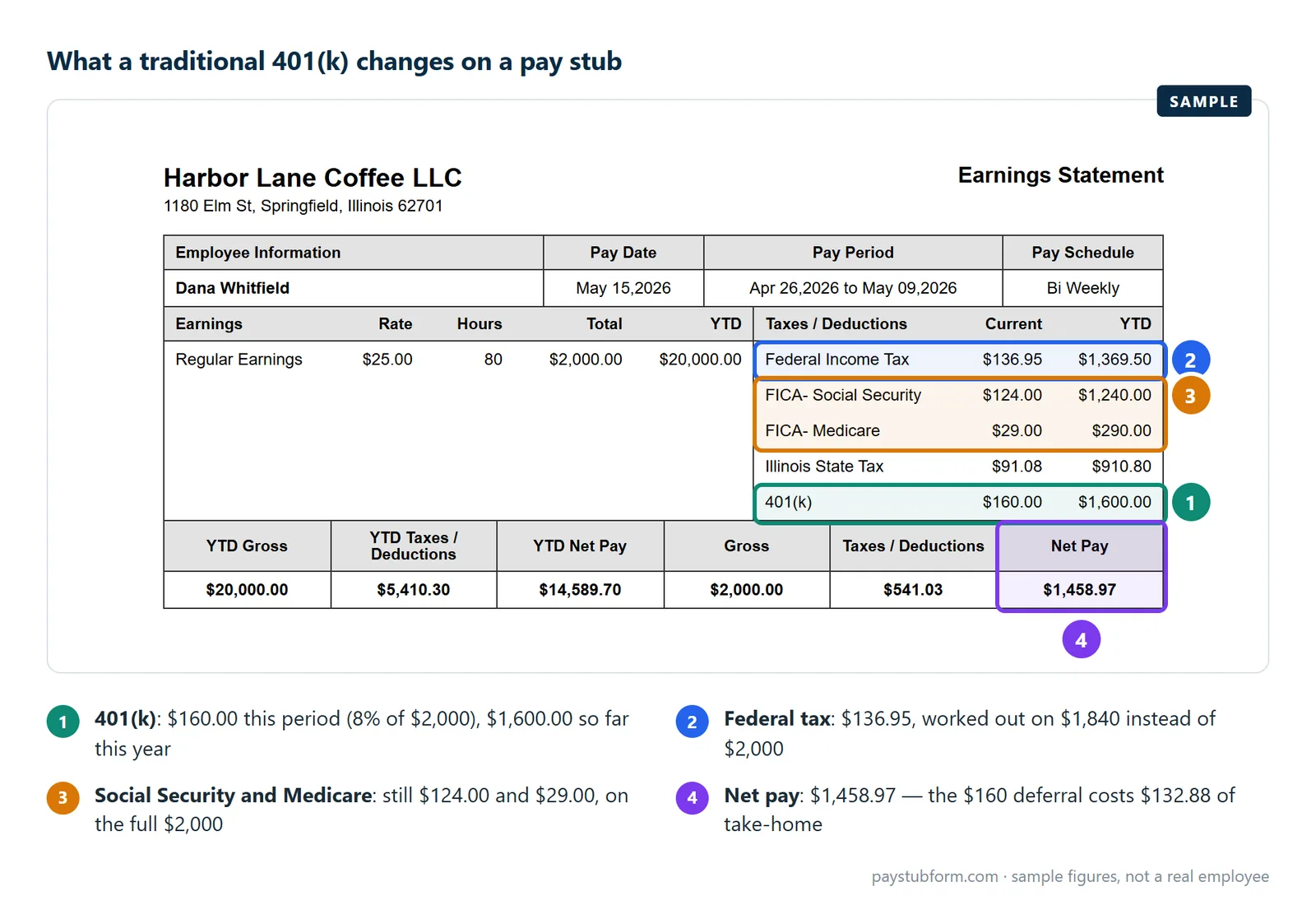
A traditional (pre-tax) contribution reduces your federal taxable wages. Defer $400 and the figure the income tax is calculated on drops by $400. On the stub, taxable wages will be lower than gross pay by at least the amount of the deferral.
A Roth contribution comes out after tax. Your taxable wages do not move at all; the deduction simply reduces your net pay. Same contribution, same balance growing in the plan, completely different effect on this paycheck.
If you believe you elected pre-tax and your taxable wages are not falling, that is worth a question to payroll before year-end rather than after.
The 2026 limits, and what they mean per paycheck
| Limit | 2026 | 2025 |
|---|---|---|
| Employee deferral (under 50) | $24,500 | $23,500 |
| Catch-up, age 50+ | $8,000 | $7,500 |
| Catch-up, ages 60–63 | $11,250 | $11,250 |
| Total employee + employer additions | $72,000 | $70,000 |
| Compensation that can be counted | $360,000 | $350,000 |
The deferral limit covers your own contributions only, and it follows you across employers in the same calendar year — change jobs in June and the new plan has no idea what you already deferred at the old one. The $72,000 figure is different: it is the ceiling on everything that lands in the account, your deferrals plus the employer's match and any profit-sharing.
Turning the limit into a per-paycheck number is simple arithmetic worth doing once. On 26 biweekly pay dates, maxing out means $942.31 a period. On 24 semimonthly dates it is $1,020.84. Compare that to your current deduction and you will know in seconds whether you are on pace.
New for 2026: catch-up contributions must be Roth above $150,000
This is the change most likely to show up on a 2026 stub without explanation. Under the SECURE 2.0 Act, beginning in 2026, participants in plans that offer Roth must make their catch-up contributions on a Roth basis if their prior-year wages with that employer exceeded $150,000.
What it looks like in practice: you are 54, you earned $170,000 last year at the same employer, and your catch-up money that was coming out pre-tax in December is now coming out after tax in January. Your regular $24,500 deferral is untouched — only the $8,000 catch-up moves. Your taxable wages rise by that amount over the year and your net pay falls slightly, even though your total contribution has not changed.
Two details worth knowing. The threshold is prior-year wages with that plan sponsor — change employers and the clock effectively restarts. And it applies to plans that offer a Roth feature; a plan with no Roth option cannot offer catch-up contributions to affected participants at all.
If your January paycheck was different and this is not the reason, the other January changes are covered here.
Reading the employer match
The match line is informational, not a deduction. Two things about it are worth checking.
Are you capturing all of it? A common formula is 100% of the first 3% of pay and 50% of the next 2%, for a maximum employer contribution of 4%. Contribute 3% instead of 5% under that formula and you leave 1% of your salary behind every year. Check your plan's actual formula against your actual rate — the stub shows both numbers side by side.
Are you front-loading into a gap? Many plans match per pay period rather than annually. Hit the $24,500 limit in August and your deferrals stop, so there is nothing to match for the rest of the year — and unless your plan has a "true-up" provision, that match is gone. Spreading contributions evenly across all pay dates avoids it.
The match is also usually subject to vesting. It appears in your balance before it is fully yours, and leaving early can mean leaving part of it behind. That is a plan document question, not a pay stub one, but it is worth knowing which part of the balance you would actually keep.
Why your 401(k) does not reduce Social Security and Medicare tax
This surprises people every year. A traditional 401(k) deferral is excluded from federal income tax wages but not from Social Security and Medicare wages. You pay 6.2% and 1.45% on money you never saw.
On the stub that shows up as three different wage figures: gross pay, a lower federal taxable wage, and FICA wages that sit at or near gross. At year end it becomes the gap between Box 1 of your W-2 and Boxes 3 and 5.
Pre-tax health premiums under a Section 125 plan behave differently — they reduce all three. So two deductions that both call themselves "pre-tax" have genuinely different effects on your paycheck. Our guide to Social Security and Medicare on a 2026 pay stub works through the wage bases; gross pay versus net pay covers the full stack of deductions.
Tip: If you want to know what a 1% change costs you per paycheck, multiply your gross pay for the period by 1%, then multiply that by roughly 0.78 for a pre-tax contribution in the 22% bracket. The hit to your take-home is smaller than the amount going into the account.
Check your own stub in three minutes
- Find the EE contribution line and confirm it is the rate you elected, as a percentage of this period's eligible pay.
- Confirm whether it is traditional or Roth by checking whether federal taxable wages fall below gross by at least that amount.
- Multiply the per-period deduction by your remaining pay dates, add the year-to-date figure, and compare the result to $24,500 (plus your catch-up if eligible).
- Find the ER match line and check it against your plan's formula at your current rate. If the formula pays more at a higher rate, that gap is money you are declining.
- If you are 50 or over and earned more than $150,000 with this employer last year, confirm the catch-up portion is being taken as Roth.
If you need a correctly calculated pay stub showing retirement deductions in the right place, you can build one here, with 2026 federal and state figures applied.
Quick answers
Does the 401(k) limit reduce my paycheck automatically?
No. The limit caps what you may contribute; it does not set what you do contribute. Your deduction follows the rate you elected until your year-to-date deferrals reach the annual limit, at which point most payroll systems stop the deduction for the rest of the year.
Is the employer match part of my net pay?
No. The match is paid by your employer into the plan. It never passes through your wages and is never deducted from them, even on stubs that print it alongside your own contribution.
Why did my taxable wages not drop when I started contributing?
Most likely you are in a Roth 401(k), which is funded after tax and leaves taxable wages unchanged. If you elected traditional and taxable wages still have not moved, the election may not have been applied — raise it with payroll with the specific pay date in hand.
I changed jobs this year. Does my new plan know what I already contributed?
No. The annual deferral limit is yours, not the plan's, and the new employer has no visibility of the old one. Tracking the combined total across both plans is your responsibility; exceeding it creates an excess deferral you have to have corrected.
Why is my catch-up contribution suddenly after-tax?
Because of the SECURE 2.0 rule that took effect in 2026: if your prior-year wages with that employer exceeded $150,000, catch-up contributions must be made on a Roth basis. Your regular deferral is unaffected.
Can I contribute more than the limit if my employer matches?
The $24,500 deferral limit applies to your contributions alone, and the match does not count toward it. Both together are capped by the $72,000 total additions limit for 2026, which most people will never approach.
Sources
- IRS — 401(k) limit increases to $24,500 for 2026: the deferral limit and the $8,000 and $11,250 catch-up amounts.
- IRS — Retirement topics: Catch-up contributions: the 2026 Roth catch-up requirement above $150,000 of prior-year wages.
- IRS — COLA increases for dollar limitations on benefits and contributions: the $72,000 total additions limit and the $360,000 compensation limit for 2026.
- IRS Topic no. 751 — Social Security and Medicare withholding rates: the FICA rates that apply to deferred wages.
General U.S. information, current for the 2026 tax year. Plan rules vary — your summary plan description governs the match formula, vesting and whether bonuses count as eligible pay.


Comments (0)
Loading comments...
Leave a Comment