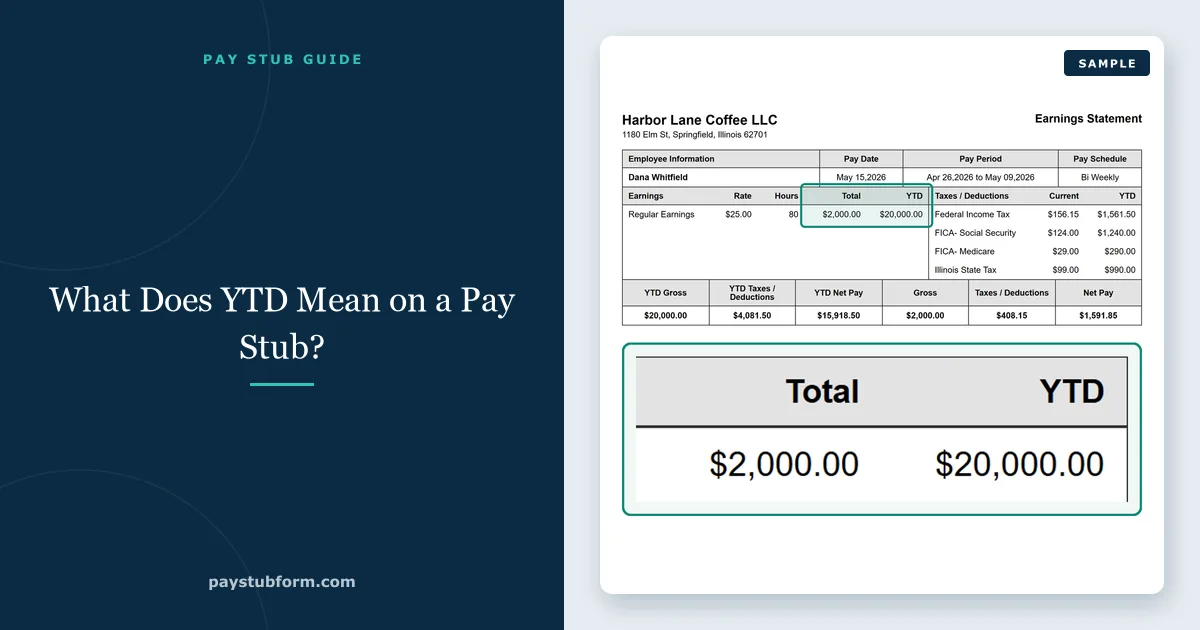
Most people read the left-hand column of a pay stub — this period's hours, this period's taxes, this period's net pay — and ignore the column beside it. That second column is the one that matters at tax time, when a landlord asks what you earn, and on the day you find out your withholding has been wrong since March.
YTD stands for year-to-date: the running total of everything paid and withheld since January 1. It is the only part of a pay stub that can tell you whether a small error has been quietly repeating itself, because a $40 mistake is invisible in one period and obvious across twenty.
Quick take: YTD columns reset on January 1, not on your work anniversary or the start of your employer's fiscal year. They reset per employer too — change jobs and the new stub starts from zero even though your tax year did not.
What the YTD columns actually total
Every line with a current-period figure usually has a year-to-date twin:
- YTD gross pay — everything earned, including overtime, bonuses and paid time off.
- YTD taxable wages — often several figures rather than one, because federal, Social Security and Medicare wages are each calculated on their own base.
- YTD taxes — federal income tax, Social Security, Medicare, and state and local tax where they apply.
- YTD deductions — retirement contributions, health premiums, garnishments, union dues.
- YTD net pay — the total that actually reached your account this year.
- YTD employer contributions — on some stubs, shown for information only and never deducted from your pay.
When YTD resets, and when it doesn't
The reset is the calendar year, because that is the unit the tax system uses. On the first pay date of January every YTD figure starts again at zero, regardless of when your pay period began.
Two consequences people get caught by:
- A new employer starts you at zero. Your annual limits do not reset — the 401(k) deferral limit and the Social Security wage base are yours for the year, not the plan's or the employer's — but the new stub has no idea what the old one totalled. Tracking the combined figure across both is your job.
- A payroll provider change can reset it mid-year. When an employer switches systems, YTD figures sometimes restart. That is a bookkeeping artefact, not a change to what you owe, but it makes the stub useless as a running total until year-end. Keep the final stub from the old system.
The three things YTD tells you that the current column cannot
Whether your withholding is on track. Divide YTD federal income tax by YTD taxable wages and you have your effective withholding rate for the year so far. If that is far from the rate you expect to owe, there is time to fix it with a new W-4 — and far more time in June than in December.
Whether you are about to hit a limit. Two ceilings matter. Social Security stops once YTD Social Security wages reach $184,500 for 2026, after which your net pay rises by 6.2% for the rest of the year. The 401(k) deferral limit of $24,500 stops the contribution entirely once reached — which, if your plan matches per pay period and has no true-up, can cost you match you would otherwise have earned. Our guide on reading the 401(k) line covers that trap.
Whether a small error is repeating. This is the real value. A rate entered wrong, a benefit deduction taken twice, an overtime rate a few cents light — none of it is visible in a single period. Multiply by twenty-six and it is. YTD is the only place on the stub where a persistent error becomes a number large enough to notice.
Tip: Check YTD once a quarter rather than once a year. Four checks take ten minutes in total and catch an error while it is still four periods old instead of twenty-four.
Why YTD gross doesn't match your salary — or your W-2
Two different mismatches, with two different explanations.
Against your salary: YTD gross includes everything paid so far this year, so overtime, bonuses and any payout push it above a simple salary-divided-by-periods figure. It also only counts pay dates that have arrived, so partway through the year it is always short of the annual number.
Against your W-2: your W-2 does not report gross pay anywhere. Box 1 is federal taxable wages, Box 3 is Social Security wages and Box 5 is Medicare wages — three tax bases, each reduced by a different set of deductions. The figure on your final stub that should match Box 1 is the YTD federal taxable wages line, not YTD gross. Our guide to why Boxes 1, 3 and 5 differ works through the whole reconciliation.
Using YTD as proof of income
A YTD figure is often better evidence than a single stub, because it shows a pattern rather than one good week. A lender looking at variable income — overtime, commission, shift differentials — wants to see the running total precisely because one period proves nothing.
Two practical points. Send a recent stub rather than the oldest one you can find: the YTD column grows through the year, so a December stub makes the strongest case and a January one the weakest. And if your income is uneven, lead with the YTD figure and let the current period support it, rather than the other way round. Gross or net depends on who is asking — lenders and landlords almost always mean gross.
Check your own YTD in three minutes
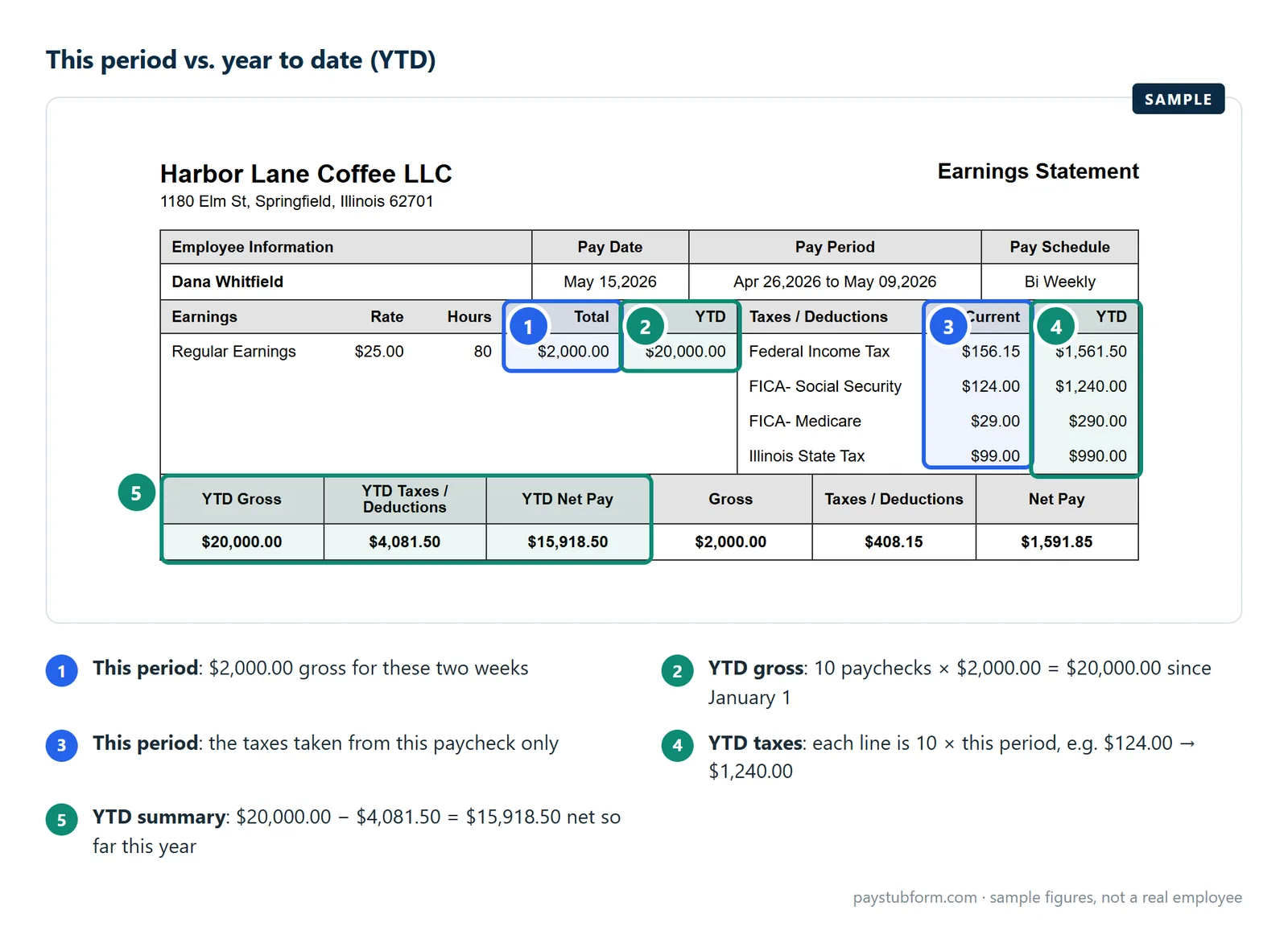
- Multiply this period's gross by the number of pay dates so far this year. The result should be in the neighbourhood of YTD gross — a large gap means overtime, a bonus, or an error.
- Divide YTD Social Security tax by YTD Social Security wages. It should come to 6.2% until the wage base is reached, then stop moving.
- Divide YTD Medicare tax by YTD Medicare wages. It should be 1.45% all year, rising only if you crossed $200,000 and picked up the extra 0.9%.
- Add YTD deductions and YTD taxes to YTD net pay. The total should equal YTD gross. If it does not, something is missing from the stub.
- Save the final stub of the year. It is the document you will check your W-2 against in January, and the one hardest to retrieve after you leave.
Depending on where you work there may be state lines running alongside these — our state-by-state guide covers what each state requires an employer to show. If you need a clean, correctly calculated stub with proper YTD columns, you can create one here.
Quick answers
What does YTD mean on a pay stub?
Year-to-date: the running total of that line since January 1 of the current calendar year, including the current pay period.
When do YTD figures reset?
On January 1, with the first pay date of the new year. They do not reset on your hire anniversary or on an employer's fiscal year, though switching employers or payroll systems starts a fresh count.
Why doesn't YTD gross match my W-2?
Because the W-2 reports tax bases rather than gross pay. Compare your final stub's YTD federal taxable wages to Box 1, and its YTD Medicare wages to Box 5 — those are the figures meant to agree.
I changed jobs. Does my new stub include the old job's totals?
No. Each employer tracks only what it paid you. Your annual limits still apply across both, so keep the final stub from the old job and track the combined figures yourself.
Why did my YTD figures suddenly restart mid-year?
Usually a payroll system change. It does not alter your tax position, but it does break the running total — keep the last stub from the previous system so the year can still be reconciled.
How often should I check YTD?
Once a quarter. It is enough to catch a repeating error while it is still small, and early enough in the year to correct withholding without a large bill or refund at filing.
Sources
- Social Security Administration — Contribution and Benefit Base: the $184,500 wage base for 2026 that YTD Social Security wages are measured against.
- IRS Topic no. 751 — Social Security and Medicare withholding rates: the 6.2% and 1.45% rates used in the checks above.
- IRS — 401(k) limit increases to $24,500 for 2026: the annual deferral limit YTD contributions are measured against.
- IRS — General Instructions for Forms W-2 and W-3 (2026): which W-2 box each year-to-date wage figure corresponds to.
General U.S. information, current for the 2026 tax year. Individual results depend on your pay, elections and applicable state or local rules.


Comments (0)
Loading comments...
Leave a Comment