Uber, Lyft, DoorDash and Instacart do not issue pay stubs, because drivers and shoppers are independent contractors rather than employees. Your proof of income as a gig worker is instead the earnings statements each app lets you download, the 1099 forms they send in January, the matching deposits in your bank account, and your tax return.
Below is where to find each of those documents in each app, how to turn them into one monthly income figure a landlord or lender can use, and what to do if you drive or deliver for more than one platform.
Quick take: Download two to three months of earnings statements from every app you work for, and the matching bank statements. Add last year's 1099s and tax return if you have them. Total your average monthly earnings across apps on a one-page summary. If a lender or landlord needs to verify DoorDash income, they start the request through DoorDash's verification partner — you do not. Never present a document as an "Uber pay stub" or put an app's name on a stub as your employer.
1. Why gig apps don't give pay stubs
A pay stub is an employer's statement of wages and withholding. Gig platforms classify drivers, couriers and shoppers as independent contractors, so there are no wages, no withholding and no stub. Lyft's help center says this directly: because drivers are not employees, it cannot provide pay stubs. What every app does provide is a record of what it paid you, and that is what reviewers want to see. Our guide to 1099-NEC versus a pay stub explains the difference in more detail.
2. Where to find your earnings records, app by app
| App | Earnings statements | Annual records | Income verification |
|---|---|---|---|
| Uber | drivers.uber.com → Earnings → Statements: weekly statements as PDF or CSV, with a weekly summary and transaction history | Tax Information section: yearly tax summary and 1099 forms | Uber's help points drivers to the weekly statements and monthly summaries for loans and housing |
| Lyft | Driver app → Account → Your info → Earnings Statement, for any week, month or year; weekly summaries in the Dashboard | Tax Center: Annual Summary and 1099 forms, posted by January 31 | No pay stubs or income letters; the earnings statement is the document to send |
| DoorDash | Dasher app → Earnings → Earnings statements, by month | 1099-NEC in the Earnings tab by January 31 for eligible Dashers | Lenders and landlords request it through Truework, which emails you to approve; proof of payment history or contractor status comes from Dasher Support |
| Instacart | Shopper app → Earnings: batch pay, tips and promotions for each batch | Year-end tax form | No self-serve income letter found; ask Shopper Support what they can provide |
Menus move between app versions, so if a path does not match, look under Earnings or Taxes in the app or the web dashboard. Amazon Flex, Grubhub, Uber Eats and Shipt work the same way: an earnings history in the app and a tax form in January.
3. Turning app statements into one income figure
Reviewers think in monthly income. Give them the figure, and the documents that prove it, on one page.
A worked example: a driver on two apps
| Month | Uber (weekly statements) | DoorDash (monthly statement) | Total | Deposited to bank |
|---|---|---|---|---|
| July | $2,310 | $1,240 | $3,550 | $3,550 |
| August | $2,480 | $1,105 | $3,585 | $3,585 |
| September | $2,205 | $1,330 | $3,535 | $3,535 |
| Monthly average | $2,332 | $1,225 | $3,557 |
The summary lists each app, each month and the average, with the statements and bank statements attached behind it. Because every figure appears in two places — the app's record and the bank — a reviewer can check it in minutes. At the common rule of income equal to three times the rent, $3,557 a month supports rent of about $1,185; our guide to proof of income for an apartment explains how landlords apply it.
Gross earnings versus what lenders count
App statements show gross earnings. Landlords and auto lenders usually work from those and your deposits. Mortgage lenders, and many personal loan lenders, use the net profit on your tax return instead — earnings minus business expenses such as mileage and phone. A driver who deducts a large mileage figure will show a much lower income on Schedule C than on the app statements, and that lower number is what a mortgage underwriter uses.
4. Should you make your own pay stub?
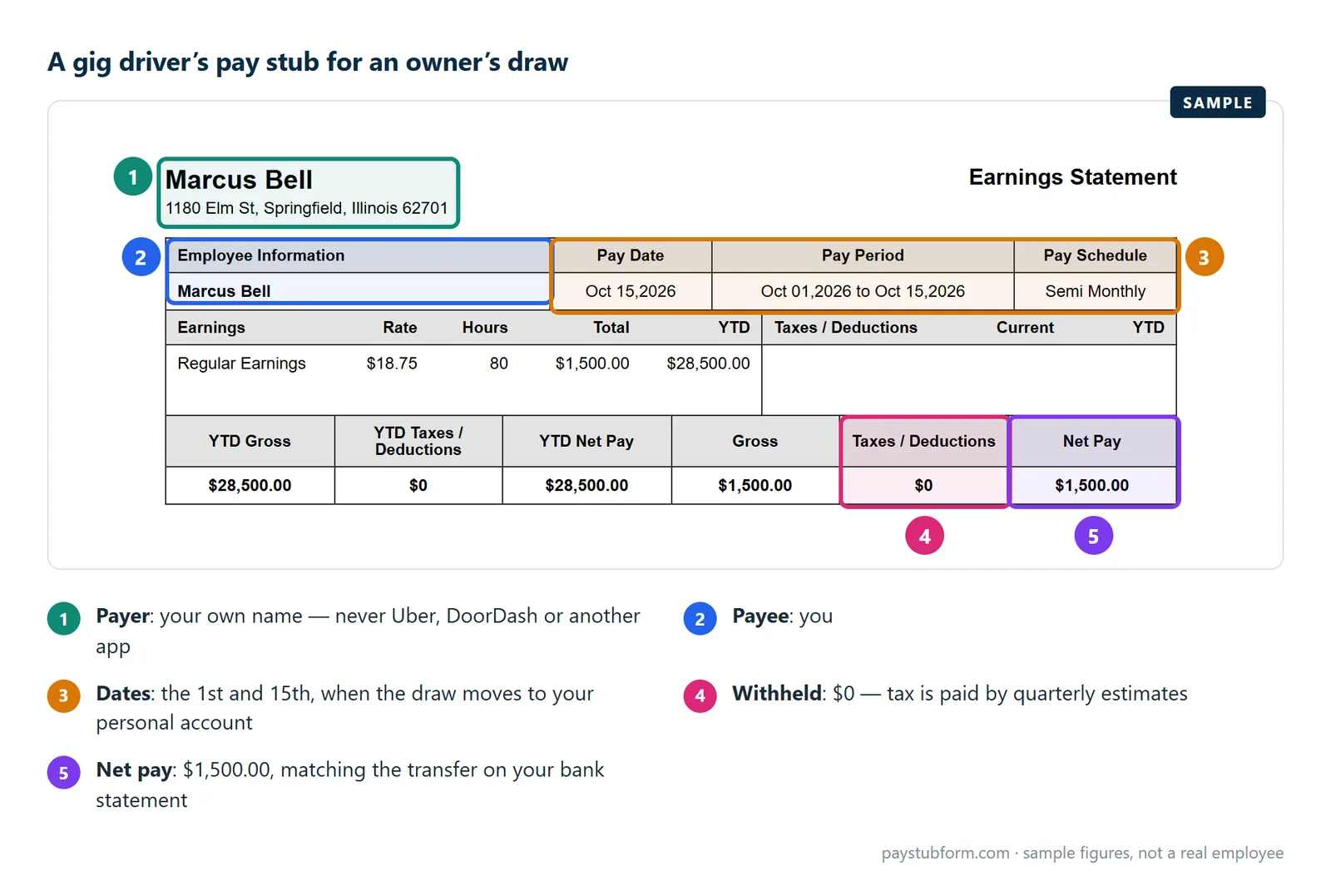
Only as a record of your own pay, never as a document from the app. As a self-employed worker you can pay yourself a fixed owner's draw from the account your app earnings land in — say $1,500 on the 1st and 15th — and make a stub for each draw with your own name as both payer and payee, no withholding, and a year-to-date total that matches your transfers. Some reviewers like that format because it looks familiar; it adds nothing that your statements do not already prove. Our guide to self-employed pay stubs walks through it, and our contractor pay stub page shows a sample. Our guide on how to make a pay stub walks through each line.
What you must not do is make a stub that names Uber, Lyft, DoorDash or Instacart as your employer, shows withholding they never took, or rounds your earnings up. That is a false document, and it is also easy to catch: the reviewer can ask DoorDash's verification partner, or simply compare it with your bank statement.
5. What to send, by who is asking
| Who is asking | What usually works for gig income |
|---|---|
| Landlord | Two to three months of app earnings statements, matching bank statements, and a one-page monthly summary; last year's 1099s or tax return if you have them |
| Auto lender | Recent earnings statements and bank statements; often last year's tax return. Some ask how long you have been driving — the app's account history or a Lyft driver accomplishment letter shows it |
| Mortgage lender | Usually two years of tax returns with Schedule C, IRS transcripts and a year-to-date profit and loss statement |
| Benefits agency | The program's self-employment income form, usually with earnings statements and an expense log |
New to gig work and no tax return yet? Send what exists: every earnings statement since you started, the bank statements that match, and a year-to-date profit and loss statement. Our guide to proof of income when you're self-employed covers that situation and the proof of income letter.
6. The tax forms you will get
- Form 1099-NEC reports payments a platform makes to you as nonemployee compensation. For payments made in 2026 the reporting threshold is $2,000; through 2025 it was $600.
- Form 1099-K reports payments processed through a payment network. The federal threshold is back to more than $20,000 and more than 200 transactions in a year, reinstated retroactively, according to the IRS. Some states set lower thresholds, and a platform may send one below the threshold anyway.
- No form does not mean no tax. All of your gig earnings are taxable, and self-employment tax applies once your net earnings reach $400. Nothing is withheld, so pay quarterly estimated tax.
Reported income is also the income that counts: earnings missing from your tax return will not count toward a mortgage, and can complicate any application that asks for transcripts. To pay the tax itself, see how to pay taxes when you're self-employed; for which form a payer uses, see 1099-NEC vs 1099-MISC.
The five-minute version
- Download two to three months of earnings statements from every app you work for.
- Download the bank statements where those earnings were deposited.
- Make a one-page summary: each app, each month, the monthly average.
- Add last year's 1099s and tax return if you have them.
- For DoorDash verification, let the lender or landlord start the Truework request.
- Never put an app's name on a stub as your employer.
Quick answers
Does Uber give drivers pay stubs?
No. Uber drivers are independent contractors, so there is no pay stub. Download weekly earnings statements from drivers.uber.com under Earnings, and your yearly tax summary and 1099s from the Tax Information section.
How do I get proof of income from DoorDash?
Download monthly earnings statements in the Dasher app under Earnings. If a lender or landlord needs to verify your income, they request it through Truework and you approve it by email; for proof of payment history or contractor status, contact Dasher Support.
Can I use a Lyft earnings statement as proof of income?
Yes, it is the document Lyft offers for this. Generate it in the Driver app under Account, Your info, Earnings Statement, and choose the week, month or year the reviewer asks for.
Will a landlord accept gig income?
Most will, when the statements show steady earnings over several months and your bank deposits match. A one-page monthly summary and last year's tax return make the decision easier.
I work for several apps. How do I show my total income?
Add up each app's statements month by month, list them on one summary page with the monthly average, and attach the statements and bank statements behind it.
Do I get a 1099 if I earned less than $2,000 from an app?
Maybe not for 2026 payments, but the income is still taxable and still counts as proof of income. Your earnings statements and deposits document it either way.
Sources
- Uber Help — Understand your weekly earnings statements and Tax documents for Uber drivers.
- Lyft Help — How to see your earnings and Tax information for US drivers.
- DoorDash Help — Dasher income verification and Dasher earnings statements.
- IRS — Form 1099-K threshold reverts to $20,000: the reinstated $20,000 and 200-transaction test.
- IRS — Instructions for Forms 1099-MISC and 1099-NEC: the $2,000 threshold for payments made after 2025.
- IRS — Self-employment tax: the $400 threshold and how gig workers pay Social Security and Medicare.
General U.S. information, current for 2026. App menus change, and requirements vary by landlord, lender and state. This is not tax, legal or lending advice.


Comments (0)
Loading comments...
Leave a Comment