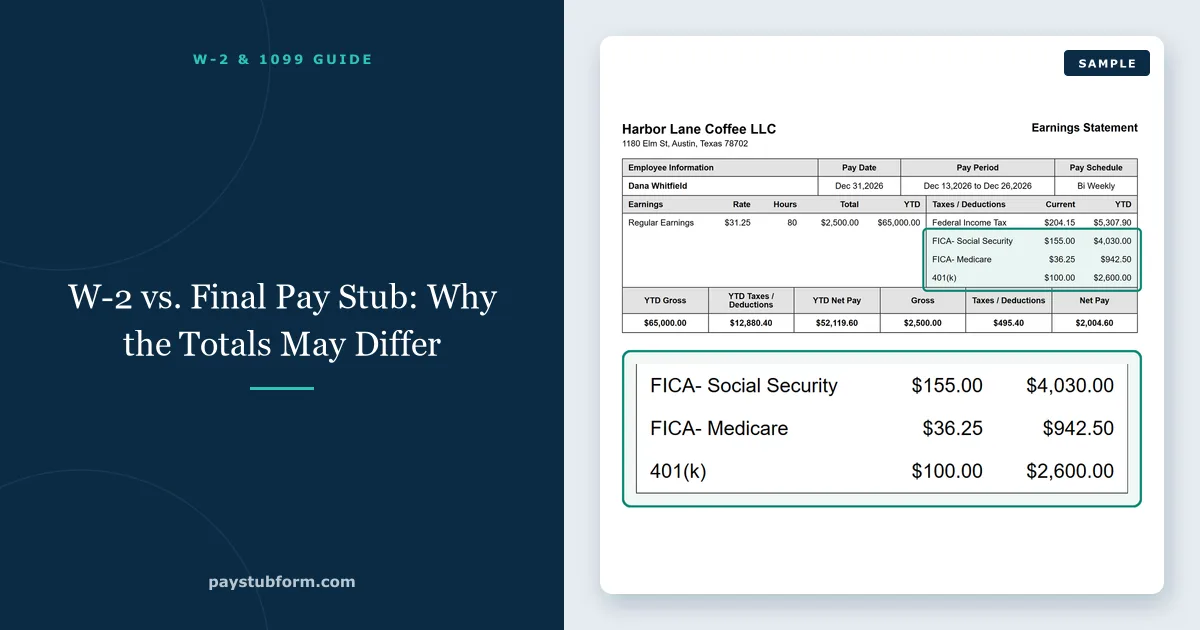
Your last pay stub of the year says you earned one number. Your W-2 arrives in January saying something else. The instinct is that one of them is wrong, and the second instinct — that it is the W-2, because the stub came from a system you watched all year — is usually backwards.
Both are right. They are not measuring the same thing. A pay stub reports what you were paid; a W-2 reports what is taxable, and "taxable" has three different definitions on the same form. Once you know which line on the stub pairs with which box on the W-2, the comparison takes about three minutes and catches the errors that are still fixable.
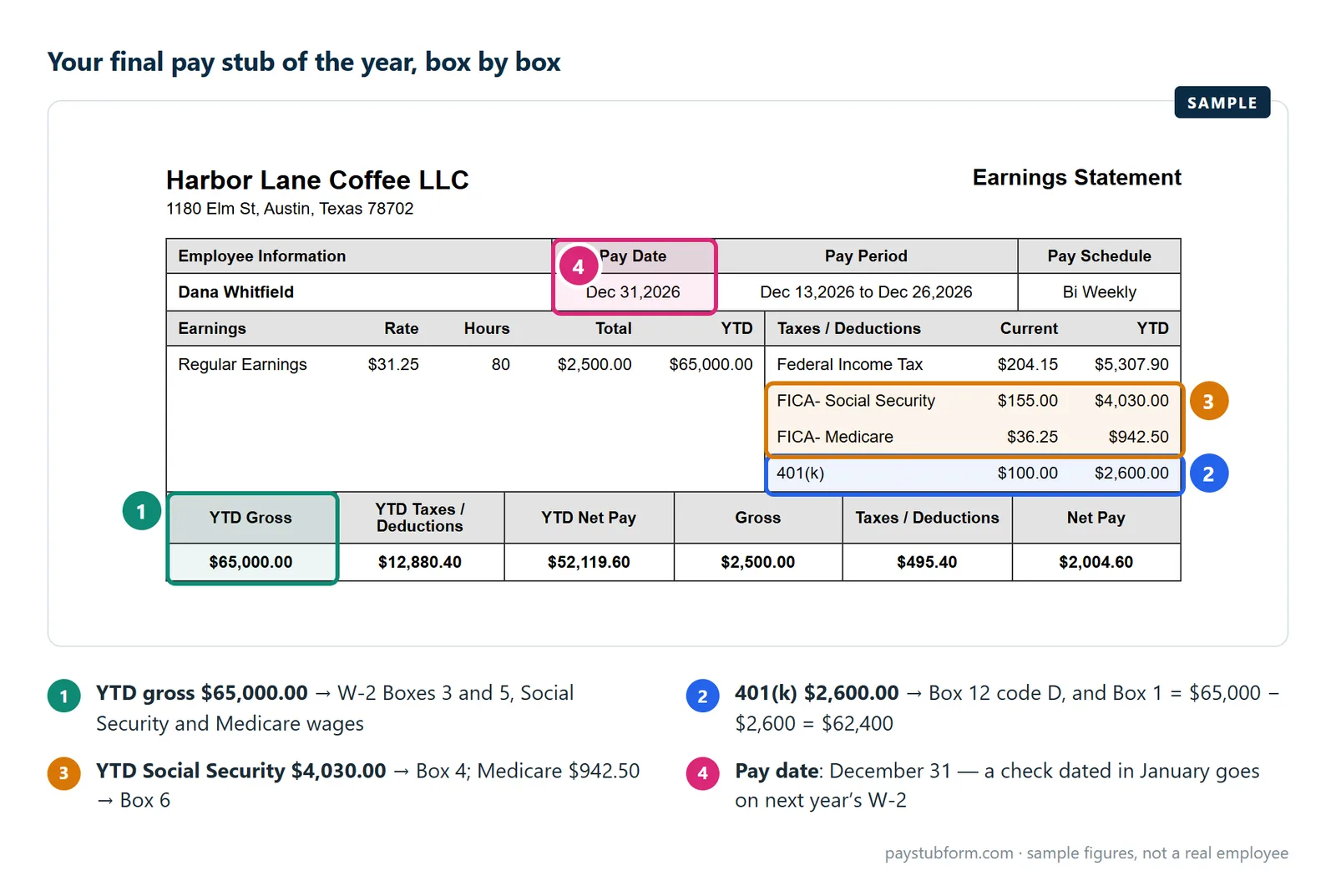
Quick take: Your stub's year-to-date gross pay should not match any W-2 box. Compare YTD federal taxable wages to Box 1, YTD Social Security wages to Box 3, and YTD Medicare wages to Box 5.
Why gross pay appears nowhere on a W-2
There is no box for "what you earned". Every wage box on a W-2 is a tax base — the figure a particular tax was calculated on — and each is reduced by a different set of deductions.
- Box 1 is wages for federal income tax. Reduced by pre-tax retirement deferrals and by Section 125 benefits.
- Box 3 is wages for Social Security. Reduced by Section 125 benefits but not by retirement deferrals, and capped at $184,500 for 2026.
- Box 5 is wages for Medicare. The same reductions as Box 3, with no cap at all.
So an employee who deferred into a traditional 401(k) sees Box 1 well below Box 5 — the IRS is explicit that elective salary deferrals are subject to Social Security and Medicare tax while not being subject to federal income tax withholding. The deferral is missing from Box 1 and present in Boxes 3 and 5. Our guide to why Boxes 1, 3 and 5 differ works through the whole arithmetic.
The pairs that should actually match
| On your final pay stub | On your W-2 |
|---|---|
| YTD federal taxable wages | Box 1 |
| YTD federal income tax withheld | Box 2 |
| YTD Social Security wages | Box 3 |
| YTD Social Security tax withheld | Box 4 |
| YTD Medicare wages | Box 5 |
| YTD Medicare tax withheld | Box 6 |
| YTD traditional 401(k) deferral | Box 12, code D |
| One third of YTD overtime pay (paid at 1.5× the regular rate) | Box 12, code TT (new for 2026) |
| YTD reported tips | Box 12, code TP (new for 2026), and Box 7 |
| YTD gross pay | nothing |
If those pairs line up, your W-2 is right and you are done. The year-to-date columns exist for precisely this comparison.
Six reasons they legitimately differ
When a pair does not match, the explanation is usually one of these rather than an error.
Timing. A W-2 reports wages paid in the calendar year, not wages earned. Work done in late December and paid in January belongs to the following year's W-2 — and will not appear on the final December stub's YTD either, so this one is consistent between the two documents. What catches people is the reverse: a December pay date for November work counts as December.
You compared gross. The commonest cause by a distance. YTD gross will exceed Box 1 by the amount of every pre-tax deduction you had all year.
Imputed income. Employer-paid group-term life insurance above $50,000 of coverage adds taxable value without adding cash, so the W-2 boxes can exceed what you were actually paid.
The Social Security cap. Box 3 stops at $184,500 for 2026 while Box 5 keeps counting, so high earners should expect those two boxes to differ by design. Box 4 should be exactly 6.2% of Box 3 — a maximum of $11,439.00.
A payroll system change mid-year. When an employer switches providers, YTD figures sometimes restart. The W-2 still covers the whole year; the stub no longer does. Keep the final stub from the old system.
A correction after your last stub. Adjustments processed in late December or in January can land on the W-2 without ever appearing on a stub you received.
What to do if it still doesn't reconcile
- Check the pairs, not the gross. Most reported mismatches disappear at this step.
- Add Box 1 and Box 12 code D. The result should land close to Box 5. A remaining gap is usually a Section 125 benefit, which reduced Box 5 as well.
- Check the new 2026 codes. Code TT should be the premium part of your overtime, not the whole overtime line, and code TP should match your YTD reported tips. A missing or wrong TT or TP costs you the matching deduction, and the IRS says an employer that finds a TT error must issue a W-2c. Our Box 12 guide covers both.
- Raise it with payroll in writing, naming the box, the figure you expected and the YTD line you are comparing it to. "My W-2 looks wrong" gets a slower answer than "Box 1 is $62,400; my final stub shows YTD federal taxable wages of $64,100."
- Ask for a corrected W-2 if they agree there is an error. That is a Form W-2c, issued by the employer rather than by you. Our guide to requesting a W-2 correction covers the steps.
- Do not simply file your own figure on the return. The IRS matches what the employer reported; filing a different number without a correction invites a notice.
Tip: Download every pay stub before you leave a job, and the final one above all. Former employees usually lose portal access on the termination date, and the final stub is the only document that lets you check a W-2 that arrives three months later. Our final paycheck checklist covers what else to take with you.
A note if you left mid-year
Two employers means two W-2s, and the combined picture is where a real, recoverable error hides. Each employer withholds Social Security up to the wage base independently, with no visibility of the other. Add Box 4 across every W-2 you receive: if the total exceeds $11,439.00 for 2026 and came from different employers, the excess can be claimed as a credit on your return. See the FICA guide for how that works and the exception when one employer alone over-withheld. When W-2s come out in 2027 covers the deadline and what to do if yours is late.
Your final wages themselves are governed by state law, and the deadline varies widely — California requires immediate payment on discharge while Texas allows six days. Our state-by-state guide has the rest. If you no longer have access to a pay record you need, you can create an accurate stub here.
Quick answers
Why doesn't my W-2 match my last pay stub?
Because you are almost certainly comparing YTD gross pay to Box 1. Gross appears nowhere on a W-2. Compare YTD federal taxable wages to Box 1 instead.
Which figure is correct for my tax return?
The W-2. The IRS matches your return against what your employer reported, so a genuine error has to be corrected by the employer on a Form W-2c rather than overridden by you.
Why is Box 1 lower than Box 5?
A traditional 401(k) deferral reduces Box 1 but not Box 5 — you pay Social Security and Medicare on deferred wages. The deferral is reported separately in Box 12 with code D.
I worked in December but was paid in January. Which year?
The year you were paid. A W-2 reports wages paid during the calendar year, so a January pay date belongs to the following year's form regardless of when the work was done.
My YTD restarted mid-year. How do I check the W-2?
Add the final stub from the old payroll system to the final stub from the new one. The W-2 covers the whole year even though no single stub does.
I had two jobs. What should I check?
Add Box 4 across all your W-2s. If the total is above $11,439.00 for 2026 and the wages came from different employers, the excess Social Security tax can be claimed back on your return.
Sources
- IRS — General Instructions for Forms W-2 and W-3 (2026): what each box reports, the Box 3 wage base limit, and Box 12 code D.
- IRS — Are retirement plan contributions subject to withholding for FICA, Medicare or federal income tax?: that pre-tax deferrals are subject to Social Security and Medicare but not federal income tax.
- Social Security Administration — Contribution and Benefit Base: the $184,500 figure for 2026 behind the Box 3 cap.
- IRS Topic no. 608 — Excess Social Security and RRTA tax withheld: claiming excess withholding when more than one employer was involved.
- IRS Publication 15-B — Employer's Tax Guide to Fringe Benefits (2026): Section 125 treatment and the $50,000 group-term life exclusion behind imputed income.
General U.S. information, current for the 2026 tax year. For a dispute about your own W-2, speak to your employer's payroll department first and to a tax professional if it is not resolved.


Comments (0)
Loading comments...
Leave a Comment