Pay Stub Template for Excel
A free Excel pay stub template with the formulas already in it — enter hours and rate, and gross pay, Social Security, Medicare, year-to-date totals and net pay calculate themselves.
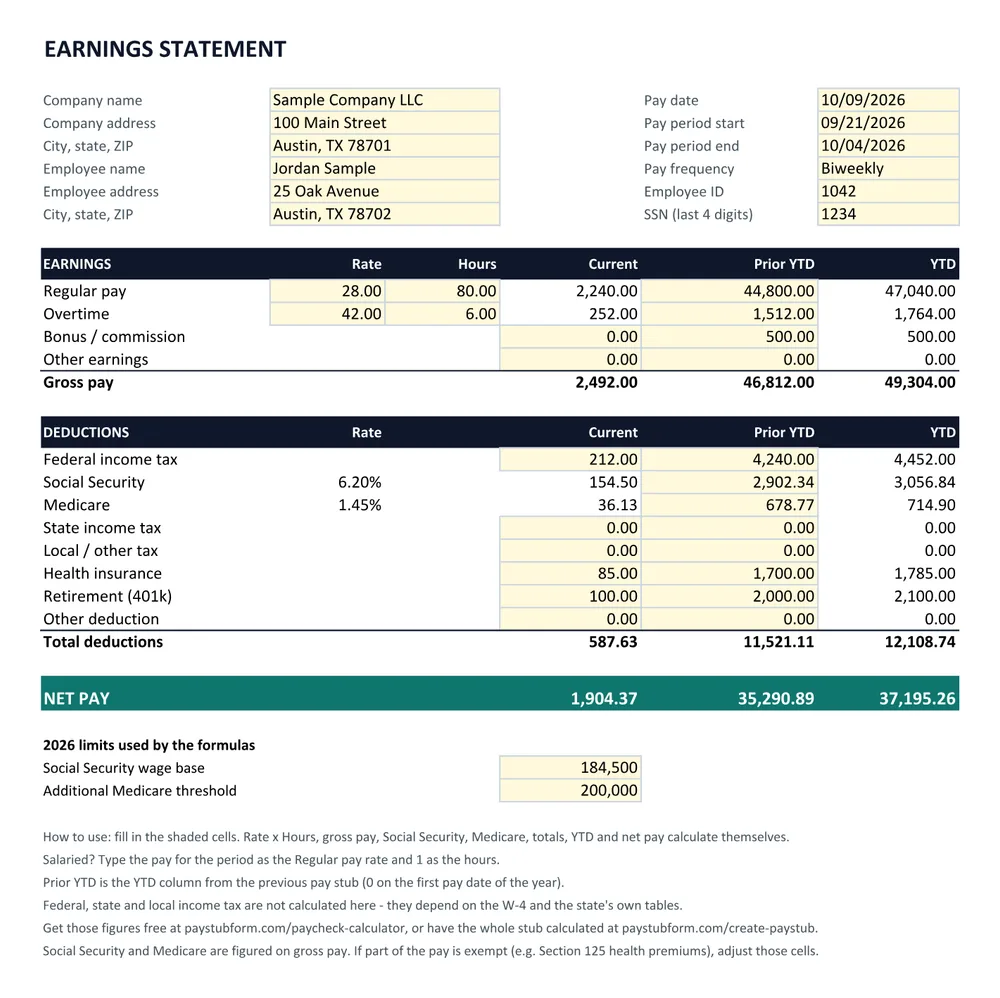
This is one worksheet laid out as an earnings statement. The shaded cells are the ones you fill in; everything else is a formula. It opens in Excel, Google Sheets, Numbers and LibreOffice, and prints on a single letter page.
Download the Excel templateExcel workbook (.xlsx) · 9 KB · No sign-upRather not do the math? The pay stub generator calculates every line, income tax included.
What the Excel template includes
- Rate × hours for regular pay and overtime, with separate lines for bonus and other earnings
- Social Security at 6.2%, stopping at the 2026 wage base of $184,500
- Medicare at 1.45%, plus the 0.9% Additional Medicare tax on wages over $200,000 for the year
- A Prior YTD column, so year-to-date totals carry forward from the last stub
- Total deductions and net pay for the period and for the year
- The wage base and threshold in their own cells, so you can update them each January
Fill it in, in three steps
- 1
Download and open the workbook
Open the .xlsx file in Excel, or upload it to Google Drive and open it with Google Sheets. If Excel opens it in Protected View, click Enable Editing.
- 2
Fill in the shaded cells
Company and employee details, pay dates, rate and hours. For a salaried employee, type the pay for the period as the rate and 1 as the hours.
- 3
Enter income tax and Prior YTD
Type the federal and state income tax withheld, any other deductions, and the YTD figures from the previous stub. Net pay updates as you type.
What this template leaves to you
- Federal, state and local income tax are typed in, not calculated — they depend on the W-4 and each state's tables.
- Social Security and Medicare are figured on gross pay. If some pay is exempt from them, such as Section 125 health premiums, adjust those two cells.
- State payroll deductions such as California SDI or New York Paid Family Leave need their own line — use Local / other tax.
- One pay date per sheet: copy the sheet for the next pay date and move YTD into Prior YTD.
Get the tax figures from the free paycheck calculator, check what your state requires on a stub in the state pay stub requirements, or skip the arithmetic and create the pay stub online.
Excel pay stub template questions
Does the Excel pay stub template calculate taxes?
It calculates Social Security (6.2% up to the 2026 wage base of $184,500) and Medicare (1.45%, plus 0.9% on wages over $200,000). Federal and state income tax are left as cells you fill in, because they depend on the employee's W-4 and the state's withholding tables rather than a flat rate.
Can I use this pay stub template in Google Sheets?
Yes. Upload the .xlsx file to Google Drive and open it with Google Sheets — the formulas and formatting carry over. Use File → Download → PDF to save the finished stub.
How do I keep year-to-date totals right?
Each sheet has a Prior YTD column. On the first pay date of the year leave it at 0. For every later pay date, copy the sheet and type the previous sheet's YTD figures into Prior YTD; the YTD column adds the current period to it.
How do I work out the income tax lines?
Federal income tax withholding comes from the employee's Form W-4 and the IRS tables in Publication 15-T, and state withholding from the state's own formula, so neither is a flat percentage. Our free paycheck calculator gives both figures for any state, and the pay stub generator fills them in for you.
Is it legal to make a pay stub from a template?
Yes — an employer or a self-employed person can prepare their own pay stubs, and a template is one way to do it. What matters is that the figures are true. Putting false wages or deductions on a pay stub to mislead a lender, landlord or agency is fraud.